PhonePe also still showing 2000 limit and max 500 per transaction
https://www.npci.org.in/what-we-do/upi-lite/upi-tap-and-pay/product-overview
I had seen it first on the Tata Neu iOS app a month or two ago and it opens the interface to complete the payment. However, haven’t had an opportunity to try it yet.
I suppose Apple is allowing the NFC chip to read content which in this case is the UPI ID stored in the NFC tag. However, actual payment over NFC is yet to be made available.
One more interesting thing is Bhim has UPI circle.. this is fastest as it doesnt need any pin -
I’ve never tried UPI because of the scams associated with it.
So this thread and title makes me think..
How can I get robbed in the fewest steps..
3 Likes
Most UPI Payments apps have Scan and Pay Widget, Drag and paste it on your home screen
If you want to skip Entering UPI Pin then use UPI Lite.
1 Like
I use Niagara and I’ve set up the right bottom icon to open GPay’s QR Scanner when I drag it a bit (tapping opens camera, also what I set). Fast enough for me, with face unlock opening the phone.
Also, I’ve tap to pay setup, so GPay icon is pinned on my home screen too. Open it, scan fingerprint and tap to pay. Pretty lovely!
1 Like
UPI lite : it doesnt even need upi pin for payments
Samsung wallet with face unlock, just need to swipe up while your screen is locked it opens upi payment screen
1 Like
I think there’s lockscreen shortcuts on the nothing phones for this.
check if your phone have the option to set camera with QR code scan directly on lock screen.
Yeah it scans it but doesn’t open GPay or Bhim, you can just copy the URL. My phone is a Moto. Does your phone do this (open payment app automatically on scanning QR in camera app). Which brand is it?
Yes from lock screen QR code widget it opens options for bhim , phone pe and other UPI apps directly
Which phone is this???
My bad, I don’t think it’s related to particular phone brand , I am using a custom rom , maybe it’s specific to custom roms , I am using crdroid custom rom
Also, how do you send payments when someone sends you a screenshot of merchant QR code to whatsapp? This requires more taps too, unless we have whatsapp payments enabled.
I have a little cousin who sends picture of qr code to my whatsapp regularly. If there is an extra phone near me, I send it to their whatsapp and then scan it from there, or else screenshot it as whatsapp detects the upi id, save the picture, then copy the text in that picture and then enter the upi id in the UPI app to send payments. Quite a tedious task sometimes.
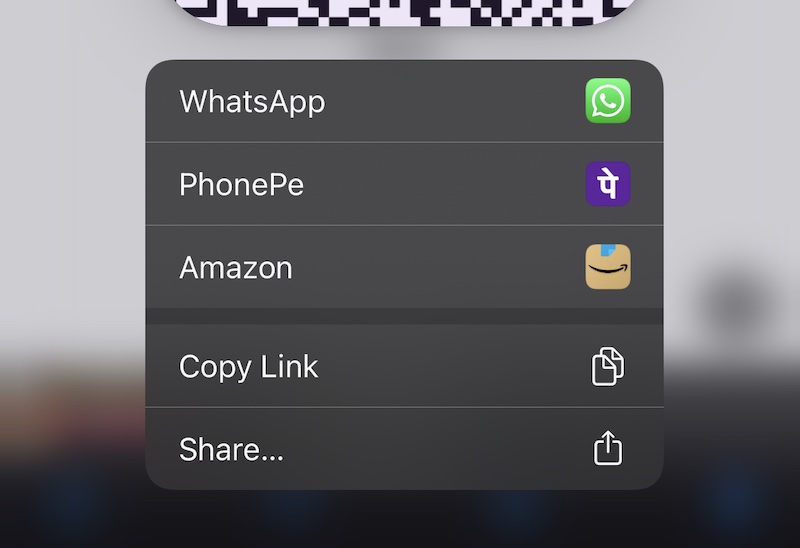
In iOS if you save the qr code to photos and long press, then a menu appears to open the qr code with any of the upi apps installed on your phone
Attachments:
2 Likes
Not able to see that option.
When u get the photo, u save it and crop only the qr code and save it…then long press?
Thank you for this. It was a pain trying to pay when someone sends a qr code to me. This method works great.
Tried a screenshot of a whole page with a small qr code. Just long press the qr code region. Doesn’t matter if the qr code is the entire pic or just a small part of the pic. It will give you the option to open it in any of the bank apps installed.
2 Likes
Sharing the image from whatsapp to Gpay works in Android.
No need to crop but you have to press and hold your finger right on top of the qr code
1 Like