The included wireless mouse has to be trash right? Also there are many mechanical keyboard under 1500rs these days it’s not like back then when you only had options of either going with TVS or 5k-8k RGB keyboard like hyperx, razer, logitech or corsair. If you are looking for a clicky durable keyboard then nothing wrong with going for it though (can’t say bad things about the OG otherwise I will be hanged for blasphemy among keeb enthusiasts)
They used to have Cherry MX blue switches but since past few years ago (5 years?) they switched to kailh switch but google says they use long hua switches now which I have no clue of.
Three major things to note before you buy this keyboard:
Keyboard is very big. There is space on all 4 sides of the keyboard so your mouse can hit the side if you use low dpi (below 1000 dpi).
Backspace key is small. Will be okay if your currency keyboard has same small size key but if not then you will have to get used to. (or be a chad and don’t make typing mistakes)
Requires 2x AA batteries so be ready to have rechargable batteries and swap them when needed. I’m sure a wireless keyboard will consume more power than a wireless mouse.
Get wired version if you are really going for it.
[From here](’
If you want, you can save 1k by going for this ram instead if you are ok with manually entering some values in bios. I use it, and it works great.
Even worst case it has a secondary profile of 6000 c36, but i run it fine at 6000 c30 with tighter timings from buildzoid.
**
That said, not sure about seller. I bought from Appario, but this seller is new. Maybe skip this …**
Checked Reddit for GetCACaps issue. One solution is to disable a task. Can be done by Task Scheduler > Microsoft > Windows > CertificateServicesClient > AikCertEnrollTask
Give it a try. Somehow I cannot fathom forking out this sum/amount of money for such trivial issue,
Just curious if any specific reason? Like have you observed memory utilization in Task Manager?
Even after turning of the Azure thingy via Task Scheduler any game I play is giving me flatlining or crash. This is due to AMDfTPM error some say in reddit.
Sometimes memory utilisation goes to 100% and system does not respond.
No this is not for HDV/M.2 since this mobo does not have at least one RGB headers and I am asking for MSI B650M Gaming wifi @ 10.3k
) patch installed from Microsoft? It has following fix “This update addresses an issue that affects the Simple Certificate Enrollment Protocol (SCEP) certificate. The system reports some SCEP certificate installations as failed. Instead, the system should report them as pending.”
Ordered the following PC parts from Elixir Computers, Coimbatore. They are gonna ship today.
AMD Ryzen 5 7600,
MSI B650M Gaming Wifi,
Team Group T-Create Expert 32GB(16GBx2) 6000Mhz CL30,
TVS Platina Wireless Mechanical Combo. All for ₹39,000.
Already ordered Patriot Viper VP4300 Lite 2TB @₹8k TE in Open Box sales
About the next set of parts?
Are they good or any changes to be taken or any cheaper parts that can be bought?
Please suggest accordingly.
Viewsonic VX2758A-2K-PRO-3 27 inch QHD IPS 240Hz Monitor @₹20.4k
MSI A750GL 750watts Gold Modular PSU @₹7.3k
Ant eSports Box C Air Cabinet @₹3.4k
Zotac GeForce RTX4060 Ti 8GB GPU @₹37.2k
Really want a MFF/SFF setup but which ever is cheaper. Don’t want any AMD GPU that fits ₹37k budget but want only nvidia GPU. Enquired about Intel Arc Alchemist B580 but no availability in India. So recommend accordingly.
Good deal on those parts.
That viewsonic monitor looks good. 2k 240hz IPS monitor in 20k is insane value for money. Do you play competitive games like valorant or CS2? otherwise that 240hz is a waste of precious budget.
You can get this [2k 170hz IPS from gigabyte](’
) and save some money. I would have recommended Acer VG271U M3 but that one seems out of stock everywhere.
Stock air cooler on that 7600? Would probably be fine but need to see.
Are you sure you want a 8GB VRAM card in 2025? That too for 37k?
I hope you know that 4060Ti is barely 10% faster than 3060Ti which an be found used for 16k or so, better get that use it for a year or two, then upgrade. New 4060Ti 8GB at 37k is a waste of money.
Seems Gigabyte GS27Q 27 Inch Gaming Monitor has bad stand according to this
I have heard many complaints about MSI monitors.
I think Acer Nitro, LG, Viewsonic are good and cheap monitors.
I don’t play any competitive games.
I have Deepcool AK400.
Yesterday I was seeing Intel Arc Alchemist B580 hardware unboxed reviews and saw B580 beating RTX4060 and RX7600 while RTX4060 Ti 8GB was above this.
Only in 1440p in some games B580 is coming on top of all others.
It seems like it does have bad stand. What peaked my interest from the article is the verdict:
*“With the M27Q out there, however, there is just no reason to buy this display.” *
If only the M27Q was similar in price, its selling at 20k right now same as the viewsonic one you were thinking about. Difference is that one was 240hz.
Since you don’t play competitive games you have a choice of going with lower hz monitors but you still wouldn’t want anything less than 120hz.
If you are going with viewsonic might as well buy [this one](’
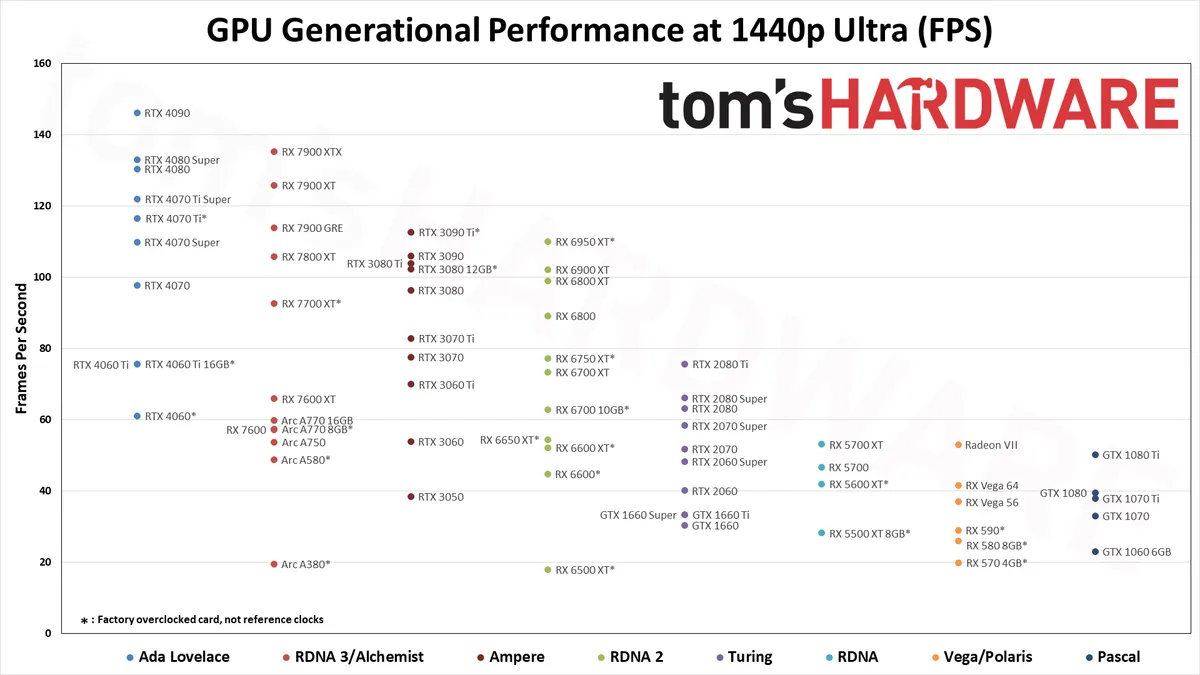
Don’t know about Intel GPUs but this graph below puts 4060 Ti worse than 3070. Both cards have same 8GB VRAM and a used 3070 can be had for 17-20k INR. You are basically paying double for warranty and better power efficiency for a card that will not be able to run upcoming titles that will require higher VRAM capacity. In that sense even though you will have warranty remaining what will it be worth.
I can understand why you would want to get a brand new GPU though.
Yes Viewsonic 27" QHD 185Hz monitor @₹16.5k is enough I think.
Looking at the GPU hierarchy I am thinking of 3080 12GB or 3080Ti 12GB either of them used cards might be good.
What could be prices of these used cards?
No. Waste of money. You may as well get a used 4070 for the same price, with a decent bit of warranty left.
3080 12GB cards are VERY rare. I’ve never even seen one listed used. 3080 Tis normally go for 32-35K. Keep in mind, you likely won’t get a warranty on it, and they are power hogs.
For desktop yes, for gaming, high brightness can look good.
When i was using xv272u, i used two profiles, desktop one with maybe 25% or 50% brightness, and gaming one with full brightness.
Day scenes look best with max brightness, night scenes anyway are fked up on ips.
Didn’t bother setting up multiple profiles because in my understanding too much brightness even while gaming is bad for eyes. You do game for long period of time. My eyes start to hurt and get itchy if I stay too long in front of monitor, this is more prominent the higher the brightness I set.