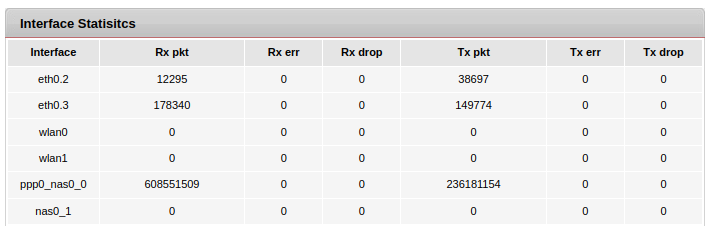
@tech_noob In Airtel modem-router, the usage statistics are displayed under LAN status section where data TX and RX values are displayed interface wise and Ethernet and Wireless are shown separately.
@The_Eternal_Guest USP of Airtel has been QoS where there’s an anecdotal saying that the plan value advertised is usually the minimum you’ll get in case of Airtel and maximum you can hope for in case of Jio. Couple that with low downtime and prompt complaint resolution, Airtel is a goto choice. Switching from such ISP to a local one is always a precarious deal where trade-off exist, even though not apparent at first.
I cannot really put it on Airtel in my case because I had been downloading entire game libraries of PS1, PS2 and Dreamcast which roughly totaled to 1.2TB so right now I’m not sure if my cap hit was of my own doing or something else at play. Will get more definitive answer once I deploy Bandwidth monitors before next billing cycle.
also I think I wanted to get a breakdown of data usage by client to figure out what specific app might be using the bandwidth which airtel surely doesn’t have. I am considering upgrading router (adding my router after airtel box) for better monitoring. so far, Ubiquiti or Microtik seem to be the consensus picks but still exploring.
Yeah, Airtel router is just basic packet counter. For more bespoke approach, you’ll need a better unit. I’m using Slate 7 and LuCI has many packages for bandwidth monitoring, link to which has been provided by @desi_gamer in my initial post’s thread link.
I haven’t used either, Mikrotik or UbiquitI but given the polished interface and aesthetics, Ubiquiti is Apple of routers and Mikrotik is Android
Feels like I might go with grandstream GWN7002. Seems like it has all features a noob could explore with decent interface.
Question if someone can advise: if I add a better router, is it worth putting the isp default router in bridge mode or try to bypass it using the gpon onu stick as some people have done? I am behind cgnat and think double nat shouldn’t be an issue except maybe a bit of overhead but would love to just get rid of the isp router, unless it’s unstable or painful process. Can’t afford to tinker with internet regularly.
The only way to get rid of Airtel’s router is to have a 3rd party OLT that can fully emulate the ISP provided router. My ordeal to replace Airtel Nokia router with VSOL 2804 is well documented here on the forum and even on India Broadband forum, where the crux was this. So HSGQ SFP OLT is what you’ll need to do so plus a fibre to copper converter. So you are looking at additional expense and devices. Easier and cheaper approach would be to just shift your LAN to the new router and run on a different subnet. You’ll eventually get used to the new address scheme and won’t even need to remember it if use reverse proxy along with DNS sinkhole. Only minor irritant that would remain would be Airtel’s WiFi AP, which cannot be disabled but has its use if using Network printer such as Brother.
Thanks. I am also thinking of going the same route..you can disable wifi on Airtel router btw..there is a button the back to switch it off. I have done that and wifi is served via deco mesh which is connected to airtel router in ap mode.(Decos are quite dumb too in terms.kf features but better than airtel native router).
didn’t check the features but I know I can’t buy this one based on looks alone. These routers look like aliens monstrosities to me and if I hate anything more than tempered glass side panels, its so many tentacles on routers.
I realize that, none of the routers look aesthetically pleasing unfortunately with this featureset by these guys. Ubiquiti looks nice but it would require me to mess around a bit more than I’d like at this stage.
But to summarize, it’s got everything one may reasonably need. Wifi6, 4X4 MIMO in both bands, DFS, and HE160.
Yeah, I think I am gonna buy Grandstream GWN7002. looks good and features seem relevant. looking specifically for bandwidth monitoring (its has deep packet monitoring so assume its there, still researching), load balancing and SFP ports. Feels reasonable on pocket too. I am not looking for wifi as I have another mesh network for it but still reading about the router and features.
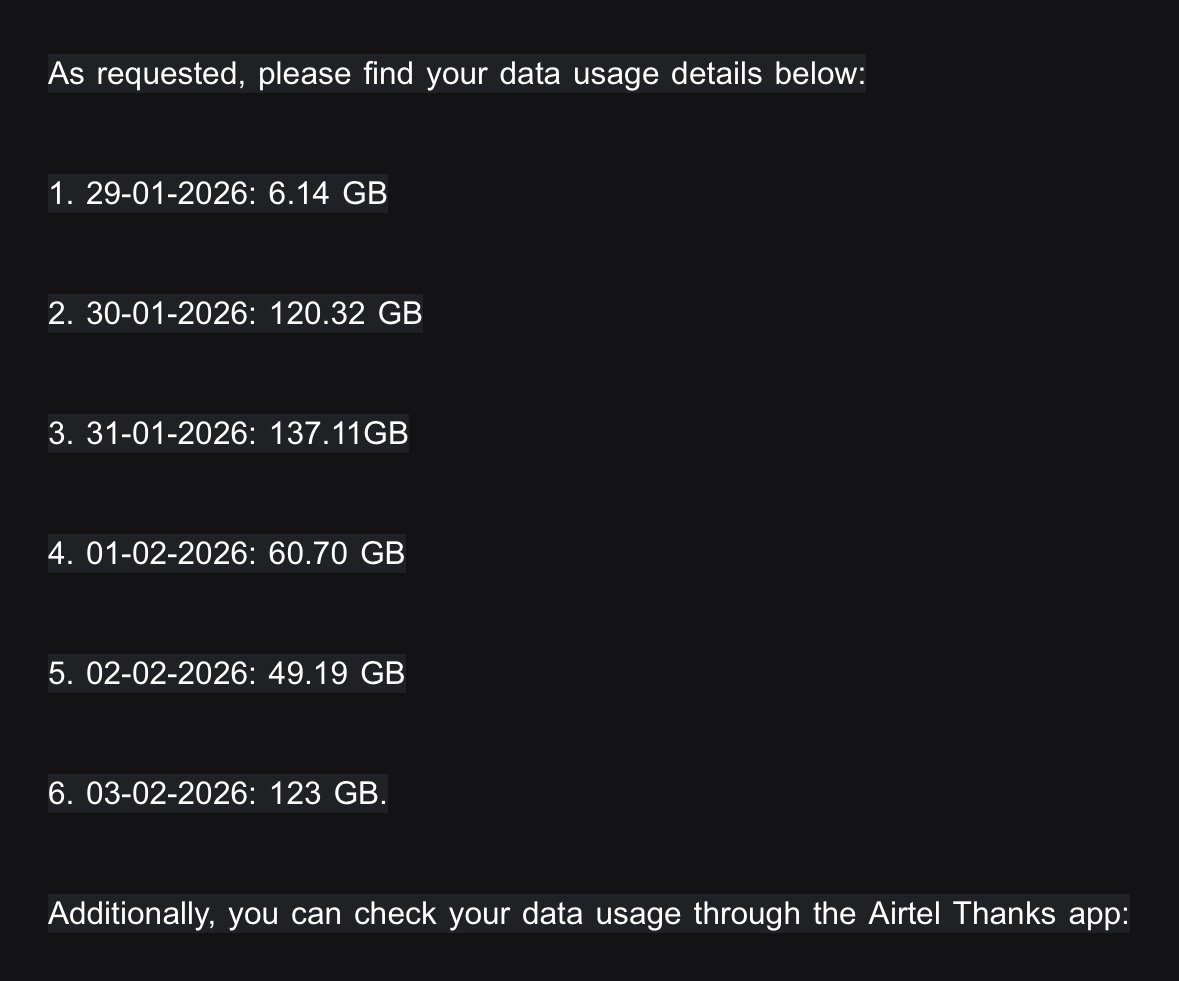
So today’s on 4th of February, they are telling me that I have exhausted 500GB of data top up that I got on 29th January. This is after the fact that I have been cautious about not downloading anything heavy. Have mailed them to give me usage stats.
Now if I drop Airtel, my available options are Jio and Net Connect. So which one is the lesser evil? Net Connect plans are in the image
for me, only available options were Jio and Airtel. I have had really bad experience with Jio so think airtel is lesser of 2 evils TBH/ local reviews might help to figure out which is best ISP in your area. in my area (Gurgaon), its hands down Airtel.
also in terms of usage, Airtel support doesnt seem to have a clue on how to investigate or even escalate any issues but so far, their bandwidth counting has been correct for me every time. In past, it happened when I downloaded tons of ISOs after nuking my old pool and this time it was rogue icloud app. I guess you cant really expect them to know what or who is using bandwidth in your home but they should be able to give you daily usage breakdown.
Those days where data is reported to breach 100GB mark, especially yesterday’s breach, is baffling as nothing was being downloaded AFAIK. The only 2 files downloaded yesterday were an episode of a series and a movie. All my content is 1080P at max as do not have 4K display/TV. No one else in my home uses any app that would warrant such high traffic.
As a precautionary measure, I disabled Airtel’s WiFi and had changed all SSIDs and passwords 10 days ago when shifted to Slate7
The services I’m running are Nginx, Samba, Transmission,Tailscale,JellyFin,VaultWarden,Stirling-PDF, Lidify and Immich.
Was waiting for start of new cycle to monitor bandwidth but guess better get to it now. Will give me an idea if it’s something internal, by the time new cycle starts.
yeah mate, time to get monitoring in order. I’d also recommmend updating or at least restarting all the apps you are running (just in case something is stuck in data consuming loop).
Don’t have any smart thing in my house. Will use phone hotspot and make Slate 7 to use it and disconnect Airtel’s line and then see how much data is consumed, have around 350GB of 5G data. As for seeding thing, this is something I wanted to know, is the uploaded data also counted towards “data consumed” ?
Deployed nlbwmon in LuCI, will see how this goes. Anyway to have nlbwmon’s data dump at a custom location, so as to have duration logs? I know there’s option to Export or Import them too but I am thinking about having a custom “working directory “.