Can you open
? Or the
page at all? Can’t open with office internet, or Jio 5g, in Bangalore. Opens fine when I connect to ProtonVPN@SGP.
Can you open
? Or the
page at all? Can’t open with office internet, or Jio 5g, in Bangalore. Opens fine when I connect to ProtonVPN@SGP.
Workplace firewall may block github at some places.
It’s working for me on airtel and jio fiber.
They do not for us, as we’re using their managed infra for our codebase. Also, not working on my personal phone/mobile data either. Thanks for the input tho.
It is blocked for me  yesterday i tried to install a script from a repository and it didn’t download… wasted a couple of hours troubleshooting only to find out it is blocked :facepalm:
My ISP is hathway Chennai
JioFiber actively fluctuates between blocking and allowing it in Surat, GJ. Weird asf and their reps have no clear answer about it when asked on emails and phone calls.
The first link opens some openssl c file. second link redirects to github.com.
On Jio 4g.
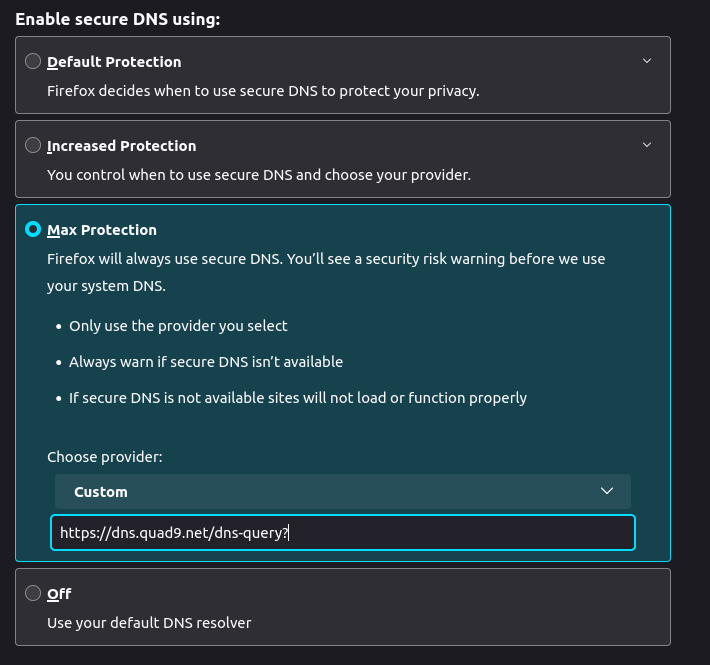
Try this secure dns setting in FF
Redirects to github.com on BSNL FTTH
Works on Jio/Vi and airtel sim in Mumbai
Jio:
Spent almost an hour trying to download the Firefox **shortcut **from here:
**[
https://raw.githubusercontent.com/mozilla/sumo-kb/main/install-firefox-linux/firefox.](‘https://raw.githubusercontent.com/mozilla/sumo-kb/main/install-firefox-linux/firefox.desktop’
)desktop**
And I failed. :banghead:
It is blocked for me in Jio Fibre. I accessed it using a squid proxy installed in a VPS hosted in the US. Online free proxies also work eg
It is indeed blocked on Jio fiber. My bad I was using GoodbyeDPI on my windows machine. My linux machines get a connection reset when attempting to connect to the host.
This is so stupid of JIo. They think the only users of their services are the ones using their shitty OTT.
Here’s a workaround I implemented in for Linux but nothing should stop it to work with windows as well:
Already tried it with my office mac, changing dns provider and hardcoding one of the raw.github… IPs. Whatever ISP we’re using seems to be trying to decrypt SSL (and failing), which breaks the connection as well. Asked IT to reroute the connection over office VPN, which seems to have worked.
It is actually creating a lot of trouble. Many apps nowadays use raw.github to fetch data. Yesterday I was installing
on my RaspberryPi and its initial setup script fetches update info from raw.github . It was failing, so I had to use a VPN to complete the installation. It looks like they not only blocking at DNS level.
# traceroute 185.199.111.133
traceroute to 185.199.111.133 (185.199.111.133), 30 hops max, 60 byte packets
 1  reliance.reliance (192.168.29.1)  7.533 ms  7.494 ms  7.480 ms
 2  10.224.240.1 (10.224.240.1)  7.958 ms  7.947 ms  9.016 ms
 3  172.31.1.147 (172.31.1.147)  9.105 ms 172.31.0.183 (172.31.0.183)  9.117 ms  9.106 ms
 4  192.168.153.52 (192.168.153.52)  9.078 ms 192.168.153.54 (192.168.153.54)  8.993 ms 192.168.153.52 (192.168.153.52)  9.057 ms
 5  172.26.104.165 (172.26.104.165)  9.044 ms  9.035 ms  9.025 ms
 6  172.26.104.178 (172.26.104.178)  10.970 ms  3.450 ms 172.26.104.179 (172.26.104.179)  2.746 ms
 7  192.168.153.34 (192.168.153.34)  6.177 ms  4.818 ms  4.799 ms
 8  * * *
 9  * * *
10  * * *
11  10.70.80.197 (10.70.80.197)  22.773 ms  18.048 ms *
12  * * *
13  49.45.4.86 (49.45.4.86)  50.924 ms 103.198.140.249 (103.198.140.249)  51.813 ms 103.198.140.64 (103.198.140.64)  19.864 ms
14  * 103.198.140.89 (103.198.140.89)  52.682 ms 49.45.4.86 (49.45.4.86)  50.894 ms
15  103.198.140.17 (103.198.140.17)  47.977 ms * 103.198.140.249 (103.198.140.249)  50.972 ms
16  * * *
17  * * *
18  * * *
19  * * *
20  * * *
21  * * *
22  * * *
23  * * *
24  * * *
25  * * *
26  * * *
27  * * *
28  * * *
29  * * *
Was in the same situation y’day. Add it to /etc/hosts file and it should work again.
To make it work for other devices on the network I’ve done a DNS rewrite for the domain to the IP address in my local DNS server. If this is done then adding to /etc/hosts is redundant.
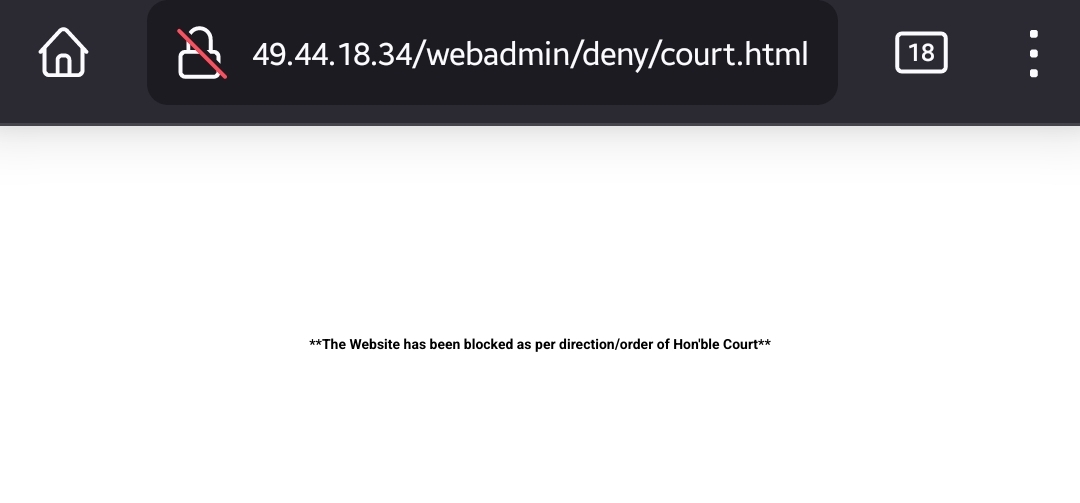
Is there an actual court order for this domain that anyone knows about?
I know that during the IPL weeks some ISPs blocked streamable, presumably because it was being used to stream parts/full content of IPL matches without authorization (just speculation on my part).
Looks like a DPI spoofing app, like the one mentioned by @@enthusiast29 does the trick.
google-chrome --proxy-server="

http://127.0.0.1:8080"
Brother mine too. I am from chennai and cuistoimer carre said the same blocked due to TROI rule
Jio at least has been randomly blocking it for over a year now in my case. Sometimes it works and sometimes it doesn’t. I have just set my DNS to 8.8.8.8 on both my pc and mobile, I tried warp too but it can really slow down my connection sometimes specially when I’m using Usenet/Torrents.
GitHub traffic is not blocked but extremely slow to open the first time on Hathway as well. It works fine after a few refreshes and download speeds are fine and I use Adguard Home on my router with Quad9 and Cloudflare.
Definitely on TRAI’s blacklist but implementation seems to be different by different ISPs.