Was thinking of debloating the win 11
Came across this over at github
Has anyone used it?
How safe is it?
Share your views reviews and feedback
Thanks
Was thinking of debloating the win 11
Came across this over at github
Has anyone used it?
How safe is it?
Share your views reviews and feedback
Thanks
have not used this particular one but looks safe going by the source on GitHub.
Alternatively, you can use Chris Titus Tech’s Windows Utility.
Why dont you try Tiny11 Builder
. You can run that offline also
I have used
utility.
It removed bunch of unused apps, removing some apps from microsoft like edge etc will be installed again when you update the system or can break.
ChrisTitus scrips are the way to go.
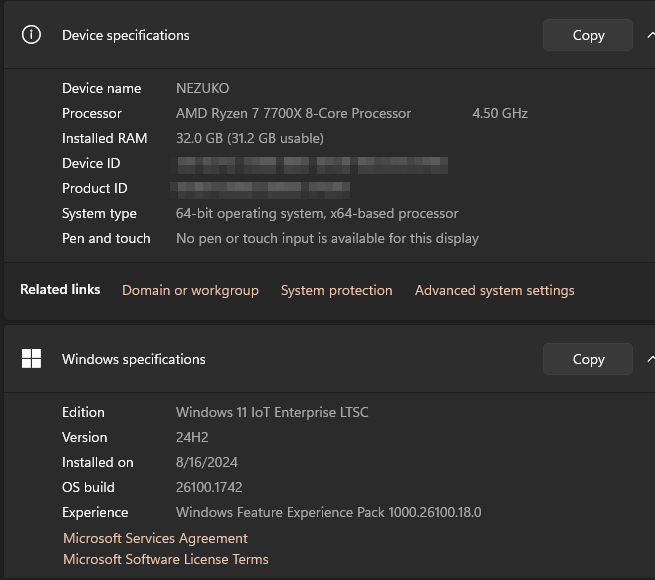
But why not use Win11 IoT LTSC edition, comes with 0 bloatware, not even MS store. No TPM2.0 requirements either and you can even log in with local account.
I have installed the win 11 fresh this afternoon and would rather debloat myself using specific options than to install a barrbones..
I Beleive I read on this forum itself about certain issues.. Let me find that thread and link of i can
Over time, users tend to create more bloat than Windows itself. Eventually, the bloat from Windows will seem like nothing compared to the mess you’ve made.
I would recommend IoT LTSC on any non-daily driver as I have it installed on my decade old tablet and works far better than any manual bloating.
Similarly, I have used almost all the tools mentioned here in the past and even setting a certain service as manual can have unintended consequences. The loss of time in diagnosing and restoring functionality hasn’t been worth it in my opinion.
Also, unless there is some rogue process, I really haven’t seen debloating significantly improve anything as long as you monitor and disable things you don’t need.
Would also recommend LTSC variants. Installed 10 LTSC 32 bit on the tablet I recently purchased from TE marketplace, runs great on a 10 year old atom, 2gb ram/32gb storage, still with 13gb free space. Can run firefox running one tab of home assistant dashboard in full screen, and physical ram usage would hover between 70-80%. Youtube 1080p video playback is also fine on edge, once h264ify is installed.
I have used Titus script to make one Microwin iso and it works like a charm. So, after you debloat, make sure to do that
Been daily driving IOT LTSC for months now. Works great for me, no issues so far.
Do share what issues you have found.
Is this version free for existing win 11 pro users?
Well I have not yet tried the GitHub stuff. I did try out the custom script as linked below. It does work well in installing quite light and selective content as well as bypasses Microsoft Account and TPM for older hardware in Windows 10/11.
Not sure, I directly installed the ISO
No,
Windows 11 IoT Enterprise LTSC is not free for existing Windows 11 Pro users:
Licensing: Each release of Windows 11 IoT Enterprise LTSC requires a separate license.
Support lifecycle: Windows 11 IoT Enterprise LTSC has a 10-year support lifecycle, which includes monthly quality updates.
Evaluation: You can evaluate Windows 11 IoT Enterprise LTSC with a 90-day free trial.
Well in that case I ll first try and take my chances with these debloating scripts as win 11 is being run on my secondary system.. Bought it just to try the win 11…( And ultimately to automate some downloading streaming, if I can figure out)
Without MS store, one can’t install the latest nvidia control panel so even if windows install the latest nvidia driver there is no way to control the settings using nvidia control panel. However, one can install MS store in win 11 LTSC IoT by running a simple command in powershell as admin.
Win11 IoT Ent LTSC will never have any problem. It is the hidden gem from MS for general consumers, and it is the most cleanest lightweight variant ever available. And since it is officially from MS there is no question of compatibility or malware or anything. Works well under 2GB of RAM also!
This was the best
What i did - Use the above to create my own unattended conf file
Use tiny11builder and above generated conf file .
Got a fast system with all MS shit removed . With install of all Apps including Office which itself takes 4/5Gb my disk is at 50 GB used
Microsoft maintains its own Windows debloat scripts on GitHub
Not that updated though.