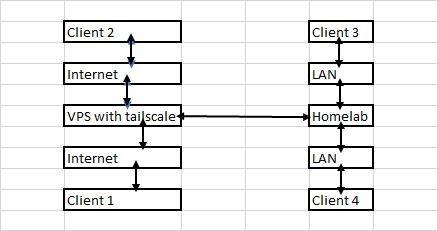
which means that anything random on the internet cannot directly reach the Homelab, but will first have to go through the VPS hosting Tailscale to get any access and hence more secure that way? Pardon my ignorance. Just starting out on the Homelab journey. Received some hardware. Will start setting up in the coming days.
Rustdesk with tailscale solid so i can control anywhere and even setup my monitorless server smoothly ( so thats marked completed )
-Nextcloud tried to do via docker & VM both failed ( for now skimming outside using chatgpt will need to make a sure sitting and go through completely to set it up )
-Jellyfin / HA works well (skin & setup pending )
-For now in learning phase with chatgpt and google help trying out stuff so once i get a hang will remake in clean state with some neat options
Still need to go through the above vps methods mentioned and learn and experiment with them
Midnight update Kudos to you coders bruh my head just spins
Nextcloud on AIO was a nightmare
Chatgpt recommended to go ubuntu install on my win 11 route and setup using terminal but localhost works opening ports colliding with jellyfin , lots to learn
I just use wireguard hosted on my free tier oci VM and I haven’t spent any time fixing it over thr last couple years which had been amazing. Some amazing services I use are immich for photos,paperless-ngx for documents, jellyfin for media, navidrome for music, Komga for manga/books and ofc running game servers to play with my friends
yes, thats the idea. Also I don’t open any port except https. so all the traffic hits caddy reverse proxy and then it sends it to home server over tailscale.
I don’t have to necessarily do is this way but my ISP doesn’t provide any public ip on router by default, so I use VPS to expose the applications to the internet.
If you have public ip address on your router, then you don’t have to use VPS, you can directly terminate traffic to your home server and use reverse proxy to route it to different applications. It will be equally secure.
Also a small question regarding files , would a NAS be better to connect to my lenovo tiny or just enclosures for the SSD & HDD better using hub as i have a few of them cheap from a friend ( if the room is cool enough ) right ?
NAS is obviously better as it will be running in a separate system and have its own storage configurations like raid 0, 1 or 5. But its costly. You can work around with a diy nas by running truenas in a system you have and attaching storage to that system.
First you should use hdd/ssd with enclosures and then work your way to NAS. Do read about various raid configuration and use which suits you better.
RTL9210 / RTL9210B – Cost-efficient, stable 10 Gbps; supports NVMe + SATA combo; good thermals.
RTL9220 – Updated Realtek controller for high-efficiency 10 Gbps; stable performance.
Also with a quality USB hub possible to tie them up together ? most nvme will hold files only and very rare 1 nvme will be under load as i am the only person will be using 99% of time
If you are looking for high speed enclosures and want to utilise their full speed (or as much as you can) make sure there are no bottlenecks in the way. If your router has gigabit lan port then you wont be able to utilise more than 1 gbps speed. If your router has 2.5 gig port but your system has 1gbps nic even then you would be bottlenecked to lower 1 gbps speed. So if you are looking for higher speed enclosures also check your nic and router and cable. If your use case is mostly over wifi then there is no need for high speed enclosures as you wont even hit 1gbps in that case.
 Just starting out on the Homelab journey.
  Received some hardware. Will start setting up in the coming days.


