Yes, it’ll do just fine.
Okay for Asrock B650M PG Lightning Wifi.
Then how can we connect the wifi E card?
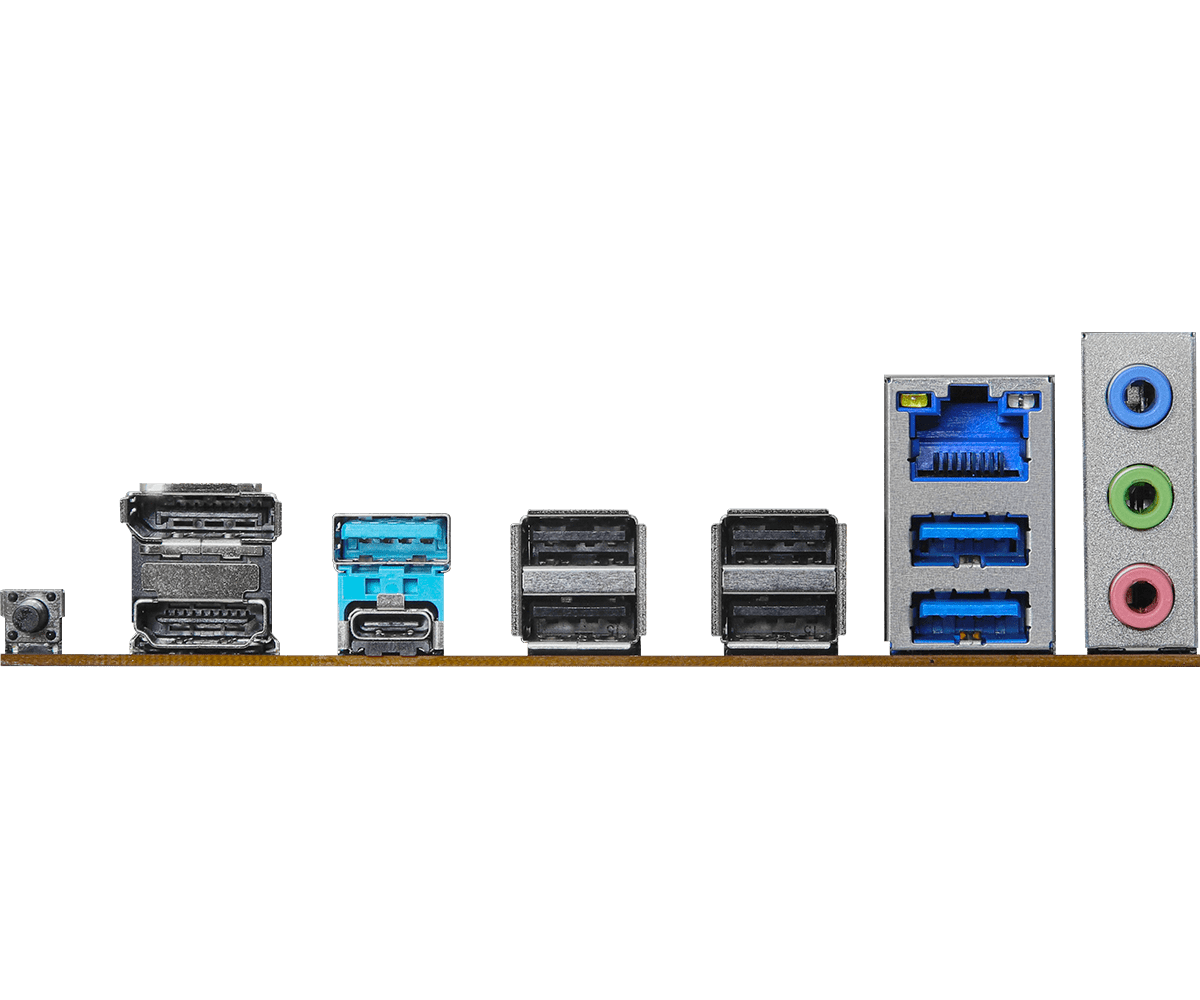
There is no facility provided at the rear panel.
See here once:
Attachments:

You can get a PCIex1-based Wi-Fi e card, and plug it into the 2nd PCIex16 slot. It’s backwards compatible.
Asrock B650M PG Lightning Wifi is 12.8k
Asrock B650M PG Lightning is 11.5k
Asrock B650M HDV/M.2 is 11.3k
While TPlink T2UB wifi/bt usb dongle is 1.2k
Which mobo to go for now?
B650M HDV + dongle. Has better VRMs
1 Like
Thanks. Will go with this then.
6 pages worth of discussions and somehow my random ass suggestion wins.. come on guys i trust you guys to be super TE users with the best suggestions.. no room for errors.
1 Like
Your suggestion is good and since my budget is very strict so has to discuss a lot to get the best bang for the buck parts under 40k. Thanks anyways for your suggestion.
1 Like
No thanks needed sir, this the least we can do in appreciation for all the contributions/news posts you and other users make on this forum.
1 Like
If you guys would actually look at the board… It does have M.2 E slot thats for WIFI. 
BTW if you get TPlink T2UB wifi/bt usb dongle (or any USB dongle) the performance will be bad if WIFI router is not in the same room. It will also be running hot whenever in use. Both together will mean the signal might drop out from time to time.
Options: [Asrock old chipset m.2 key E wifi (with weird aah antennas)](’
https://mdcomputers.in/product/asrock-wireless-adapter-3168ngw’
) <Note even though it says it’s PCIE Adaper in the title ITS NOT. Will only work on your motherboard’s M.2 type E slot.
[Newer high performance (allegedly) Highzer0 (US based company?) M.2 E (with no antennas provided it seems)](’
)

My bad, I didn’t check the image properly.
@@bssunilreddy you can either go the way as suggested above, or with the HDV. Basically, within your budget - more stable wireless connectivity vs better VRMs. You will know your use case better.
Asrock B650M PG Lightning WiFi - It has front USB type C header & 3x M.2 slots as well. With B650 Gaming X AX, you just get better VRMs. IMO 6-7k jump from MSI B650M Gaming WiFi to B650 Gaming X AX is generally worth it for most if you plan to upgrade CPU in future.
I am saying again, but inbuilt WiFi is generally superior to 3rd party options you get in India. If we were in US, would have been a different case.
I’m assuming pics are wrong, they used pics from non WiFi model & just added the M.2 WiFi card w/o the antenna ports. It has antennas in box & specs mention rear panel has 2x antenna ports.
Pics I found online:

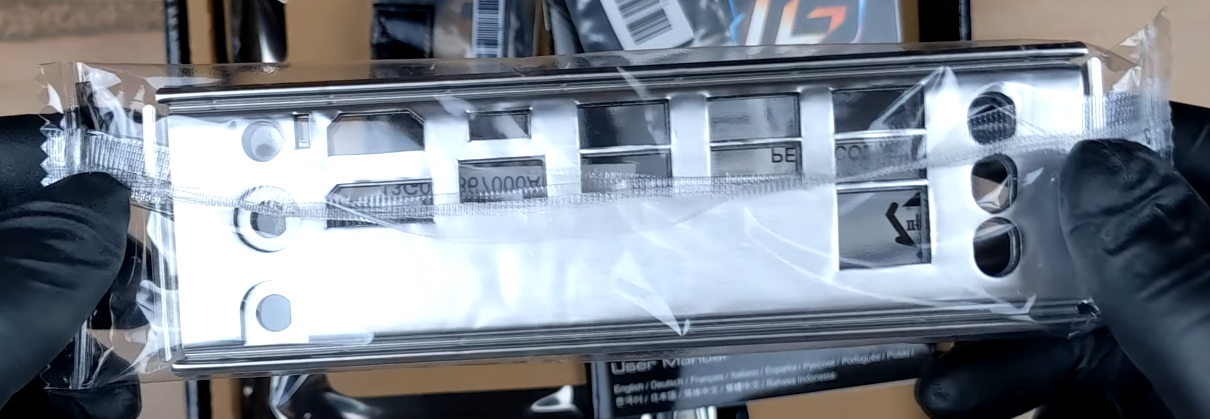
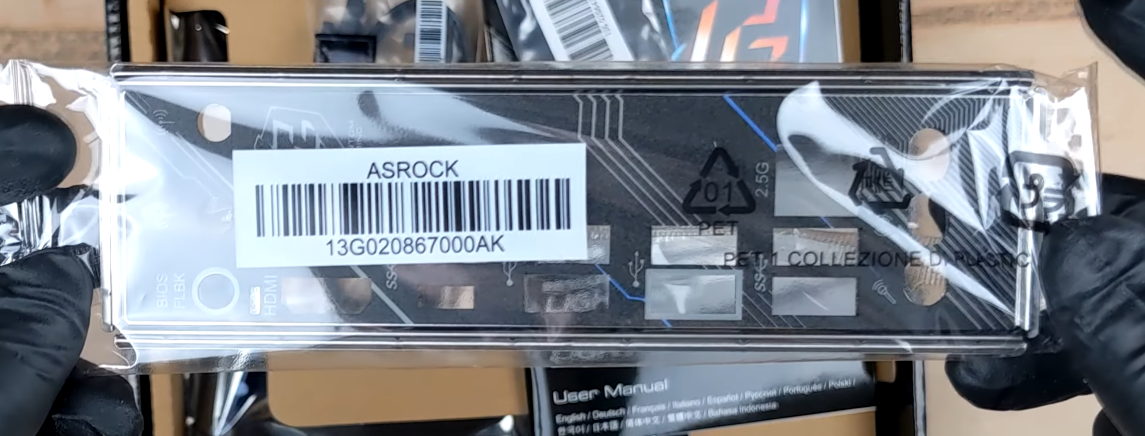
(Non WiFi model but check the bracket)
1 Like
Agreed, but within his budget (if it is that tight), I think the HDV would be a better bet since it seems to have better VRMs than the B650M PG lightning, and also has a front type C header. But yes, he will sacrifice additional M.2 slots. The Gaming X AX is the better option, for sure, else he will have to decide which trade-off is worth it.
Its better to get PG Lightning Wifi for 12.8k if its wifi connections are already fitted and We need to just connect the antennas to the rear panel only but any picture that I have seen regarding Asrock B650M PG lightning wifi are showing only the E card & antennas but no facility on the rear panel and thats why I thought it does not come fitted with the mobo but we users need to fit it into the rear panel or on one of the pcie slots. Asrock might be showing non wifi PG Lightning images for Wifi PG Lightning model I think. Because the contents listed in the Asrock B650M PG Lightning Wifi are
1 x User Manual
- 1 x I/O Shield
- 2 x SATA Data Cables
- 2 x SMA WiFi Antenna Cables
- 2 x ASRock WiFi 2.4/5/6 GHz Antennas
- 1 x Plastic Cover for Wi-Fi Module
- 3 x Screws for M.2 Sockets
Does this mean we need to install the connections by ourselves right? Only the NVME 2230 Wifi card will come fitted to the mobo and all other connections should be done by us.
Then I think if I cannot connect the small connectors to the NVME 2230 wifi card and direct it to the real panel even Asrock will deny RMA citing physical damage.
Yes, after seeing and analysing the drawback in the PG Ligtning Wifi self connection procedure I think HDV/M.2 is better for 11.3k
There is not even 1 youtube video of this PG Lightning Wifi model anywhere to just cofirm about the layout of the wifi E card and the wires leading to the back panel for antennas to be connected. Last time I took the same risk by buying asrock b550 phantom gaming 4 and convert it to wifi one by connecting the small points on e card and destroyed it so I used a PCIE wifi card instead. So I cant take that kind of chance again. But I will ask the retailer or the vendor to send me pics of the PG Lightning Wifi board once and then decide to go for it or HDV/M.2 or not.
Yes, you will need to fit the antennas into the I/O shield and the two wires from the antennas into M.2 WIFI module. Since the wires are going to the M.2 WIFI there are no slots for antennas on the BOARD itself.
Refer to the [manual here](’
https://download.asrock.com/Manual/B650M%20PG%20Lightning%20WiFi.pdf’
) from page no. 8 to 15. It’s easy-peasy looking at the steps in the manual.
They are showing correct images because the antenna slots in the I/O shield are on both WIFI and non-WIFI motherboard models. It’s cheaper for them to make one I/O shield supporting both models (and maybe more) than to make multiple different ones. After all if the consumer decides to buy non-WIFI model and afterwards install WIFI module by themselves they won’t have to install the antennas in PCIe brackets. It’s a win-win thing.
Don’t know how you managed to do that. :cyclops:
1 Like
They won’t do it unless they are building a PC for someone with same mobo when you inquire.
Converting to WiFi & inbuilt WiFi mobos are different. B650M PG Lightning will have the antenna ports wired to the M.2 card. The pics I posted clearly shows the antenna slots in I/O shield & the manual posted by @@YeAhx confirms them + the installation process. My mobo came with wire pre-installed between M.2 card & antenna ports.
Honestly, rest is upto you but my recommendations will continue to be MSI B650M Gaming WiFi for 10k or B650 Gaming X AX for 16-17k. Save money with former mobo or get a good B650.
I just learned from a reddit poster that Antennas, antenna sockets, card and wires, none of them are connected out of the box. We have to insert the wifi chip to the mobo then antenna holders to the case. The antenna holders are hardwired, so we have to connect those wires to the wifi chip on the mobo. Then at the outer end of the antenna holders, we have to connect the antennas. This is regarding Asrock B650M PG Lightning Wifi mobo.
So it’s okay to buy it right?
It comes for 12.7k
Update: The reddit poster said that Only troublesome is the fixing those small antenna cables on to the chip.
1 Like
Get it IMO if you can’t pay 16-17k for mobo
@@bssunilreddy I would suggest for an AM5 build with a decent MoBo, you would have upgrade path till 2027 (or more as in the case with AM4). If raw performance ‘right now’ is your priority and you have shortlisted 13600k/14700k etc, then go for LGA1700
Okay Bois Then I am going with the following:
AMD Ryzen 5 7600 @18,049
Asrock B650M HDV/M.2 @11,300
G.Skill Ripjaws S5 32GB(16GBx2) 6000Mhz CL30 kit @9,789
TVS Platina Wireless Mechanical Combo @2,999
Total comes to 42,135
What keys are used in the above keyboard? Does anybody know? Anybody using this keyboard? Is it good na? Please reply.
Buying from this below site is okay na?
Did anybody bought from this site?
How much time will they take to process and deliver the parts?
All above parts are available except motherboard. So buying the mobo from vedant computers.