Why not use x870 motherboards?
It’s objectively better for just 4-5k more and even has better multi-gpus support which could be useful for op considering their workload.
If someone is sure of getting benefit out of X870 over B650/B850, why not opt for it for 23k+.
The cheap Gigabyte X870 Gaming has 8+2+2 VRM, so not ideal for top of the line CPUs, hence not recommended at 21k. Gigabyte X870 Eagle is good at 22k. But not all X870 will have good dual GPU support, check the PCIe speed & lanes of 2nd & 3rd slots. Many are PCIe 3.0 x1 for non-primary slots. Higher end X870 will surely support multi GPUs with enough bandwidth but check specs carefully.
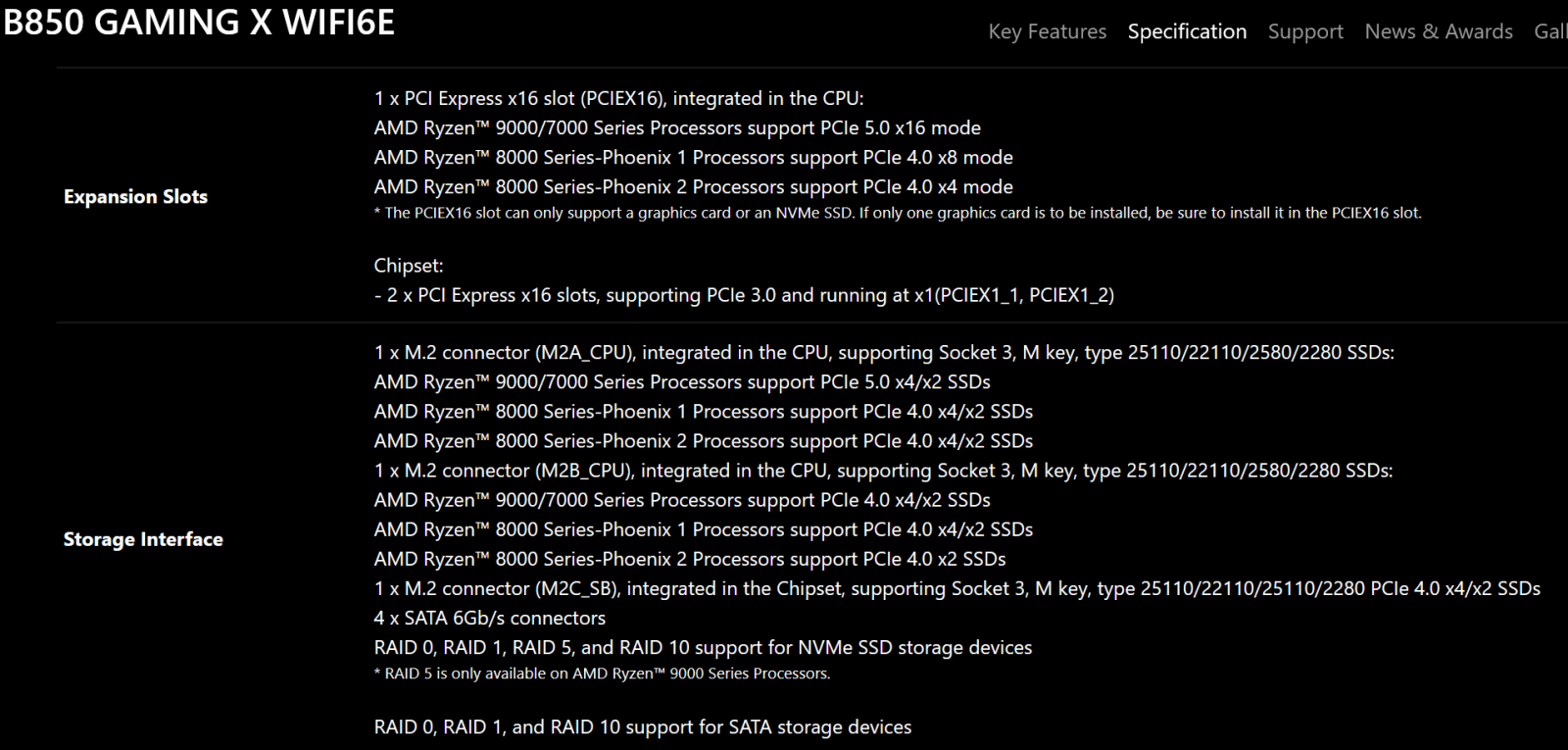
A good middle ground is the Gigabyte B850 Gaming X WiFi, has 12+2+2 VRM config, which should be enough for all current Ryzen CPUs. Costs 18-19k. Even this has PCIe 5.0 for primary GPU & M.2 slots and has 3x M.2 slots in total. I’m using this mobo.
Thanks again. My current approach in mind is to set up the PC first, then add GPU in a couple of months. Not easy for me to invest them all in one stretch. Just in case I didn’t mention, I like an upgradable option, that is, I can upgrade RAM or storage or similar in future.
You are right, the x870 I mentioned isn’t enough for most current-gen CPUs.
If someone could really use dual GPUs in the future, they should ideally get a [high-end x870](’
Ideally, this should be good for a 5060 ti, and if op wants to upgrade to a higher-end CPU like the Ryzen 9900x(12c 24t).
With 4 DIMM slots, you have enough room for a RAM upgrade if you want in the future.
With the B850, you have up to 1 Gen 5 m.2 NVMe and 2 nvme gen 4 ssds.
However, if you use the third slot, lane sharing between the GPU and the m.2 NVMe slot will most likely appear, thus your GPU can only operate at x8 instead of x16.
So most likely you can have 2 m.2 slots, 3 if you can handle gpu at x8.
*You can probably run those apps pretty fast in a Linux VM or their MAC ports. Da vinci mac app is its best. But I’m not sure. Maybe Google and check. Most seem like Linux apps. Should run well. But your call. *
No, Gigabyte B850 Gaming X WiFi has no such restriction AFAIK. Say a B850 mobo with 4th M.2 slot clearly mentions it in specs (check B850 Tomahawk). But Gigabyte has no such mention in the M.2 section of the specs.
So you can run 1x PCIe 5.0 x4 & 2x PCIe 4.0 x4 SSDs together is what I understand. Check the wording differences below.
For the B850-GAMING-X-WIFI6E, I mixed up the chipset and cpu lanes.
Most likely, lane sharing shouldn’t be a problem, and all the m.2 nvme can be used.
However the third ssd is connected to the mobo chipset. If used with many ports at once, it could affect the speeds of third.
But it would be unlikely real world situation.
its called an ASIC, all of them have for AV codecs except Apple specific ones.
Apple is ahead because of their M1 processors, they are so bloody good that the M1 CPU was doing CPU transcoding without breaking a sweat, when on Asahi Linux.