Frequently Asked Questions
-
Ensure you have 2 different pics of the item with username/date note.
-
Item needs to match Category selected.
-
Bump only 1 thread per 48 hours. Avoid unnecessary bumps, since we have received feedback to discourage low effort activity.
-
Mark thread as ‘Pending’ if still in progress.
-
Marking thread ‘Sold/Withdrawn’ will auto close thread after a while. No need to tag mods to close thread.
-
You can Update Price through :- Market (beta) (on left nav menu) > Seller Hub > Listings
-
Avoid “Good luck with sale” posts.
Added 24-2-2026
- Avoid “10 char” “abc123” type filler posts
8 Likes
How do I bump my post? I cannot see option of “bump listing” anymore.
Me too, I am also not able to see it
One needs to select check box of the listing then it shows up at right bottom
Can you give a screenshot?
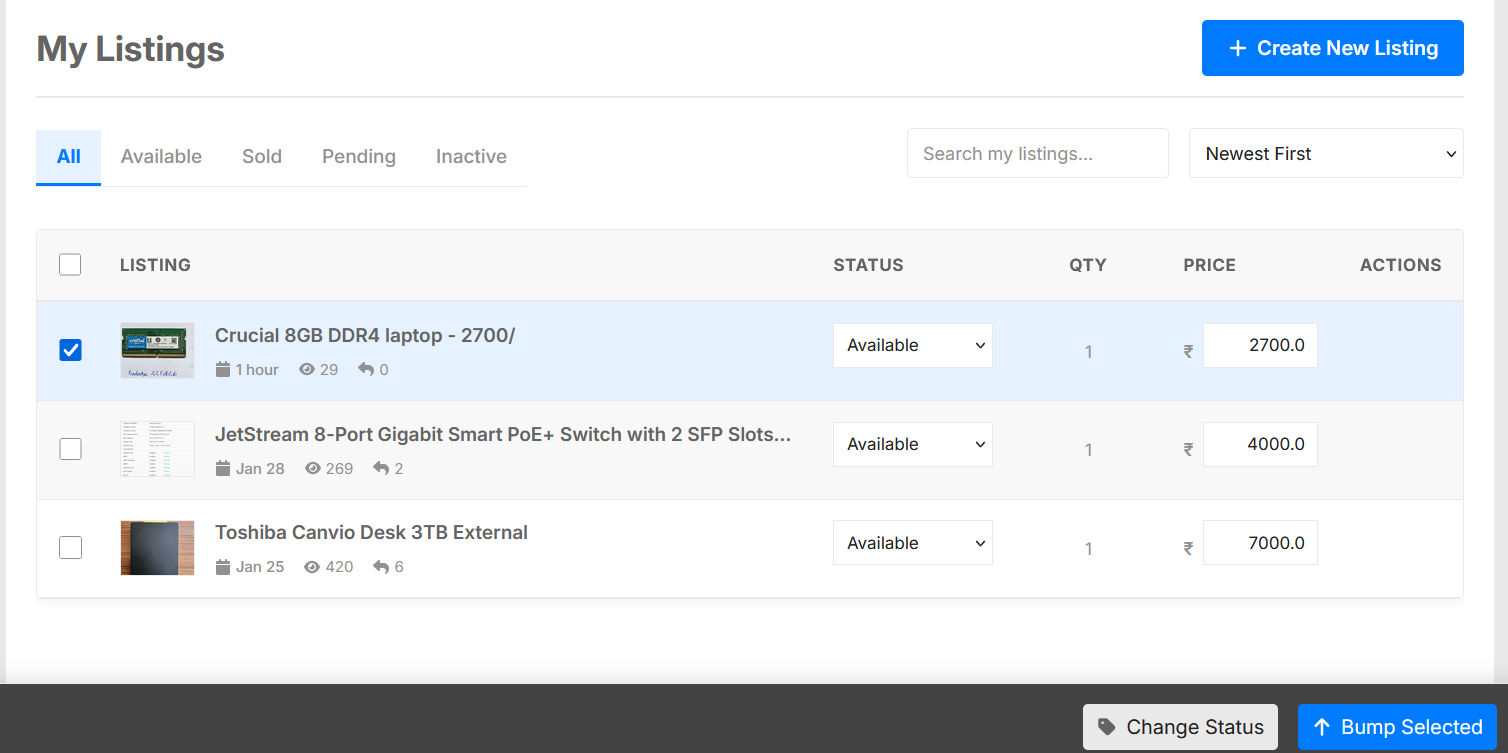
2 Likes
Where are we leaving seller/buyer feedback now? I was unable to find that. I just completed a sale and was able to mark it sold but no where was able to provide feedback on it.
Freaky has to post in your thread. I’ve informed him too.
Then the Rate button will show up below his/your post.
1 Like
I think you forgot to read this thread :
@Crazy_Eddy i used the bump feature, but my thread was still deep in the classified section, didn’t come up.
Ok sorry, I manual bumped them both right now.
Ok will bump once every 48hrs, but the marketplace bump isn’t making the listing to come up.