I have an old Windows tablet hanging from the main door as part of one of my recent 3D printing projects. It is powering an Imou IPTV camera as a door cam, but the wireless stream has multi-second lag, not to say I don’t like the Alibaba cloud streaming and neutered local Onvif support.
Instead, I want to use a webcam powered off the USB port of the tablet, acting like a CCTV using Agent DVR and such. Hence, looking for any webcam than runs reliably with a wide FOV, rather than any fancy one.
If anyone has one lying around, would like to purchase it rather than spend a lot more for a new webcam.
Changing the title to reflect that I am looking for one which is supported natively by the Linux kernel. I was previously running Windows on it mainly for dashboard usage but have a different tablet for it now.
Was running Windows 11 LTSC on it but the Windows 10 drivers don’t seem to work properly with it as something or the other conks out like the audio stops working. Would be switching the tablet to Linux.
Can’t go wrong with Logitech cams… I have the BRIO 4K model with Windows Hello IR support.. works on Linux including the face-recognition login with the howdy tool.
But just to be sure, try searching online (or ask AI) for “your-cam-model-number linux support” to see if any current reports of issues.
Yeah, I was mainly checking that and seems like a good option in terms of coverage as it has 95 degree FOV. There is also a Lenovo 500 with 75 degree FOV but that seems to be only for Windows Hello without mic.
Also, the HP 320 and 325 seemed like good options but the FOV is much narrower at 65 degree. Hence, might go with the Lenovo 300.
Linux support details are indeed spotty for all of them, but there are sporadic posts here and there about people using them with Ubuntu, so guess have to take a chance.
I do not recall the exact FOV, but it worked out of the box. It was based on ubuntu core with multiple cameras. some tuning was needed to identify the camera for placements.
Not sure what is your budget but this will work for you.
Just ask the seller to provide details like hardware/firmware versions because older ones (even though seller claims it’s “basically new”) have minor bugs/annoyances - if online commentary is to be believed.
Don’t actually want to go overboard with it as it is basically going to be a glorified peephole. Considering it will be recorded to the tablet’s 256 GB SSD, 4K might take up too much space.
Picked up a Lenovo 300 from Zepto of all places as it was cheapest at 2299. Have also switched the tablet to Zorin OS (just because it randomly popped in my mind).
Camera seems to work fine with the OS although the field of view is less than the IP Camera. But then that had a fish-eye lens causing distortion whereas this provides a more level view.
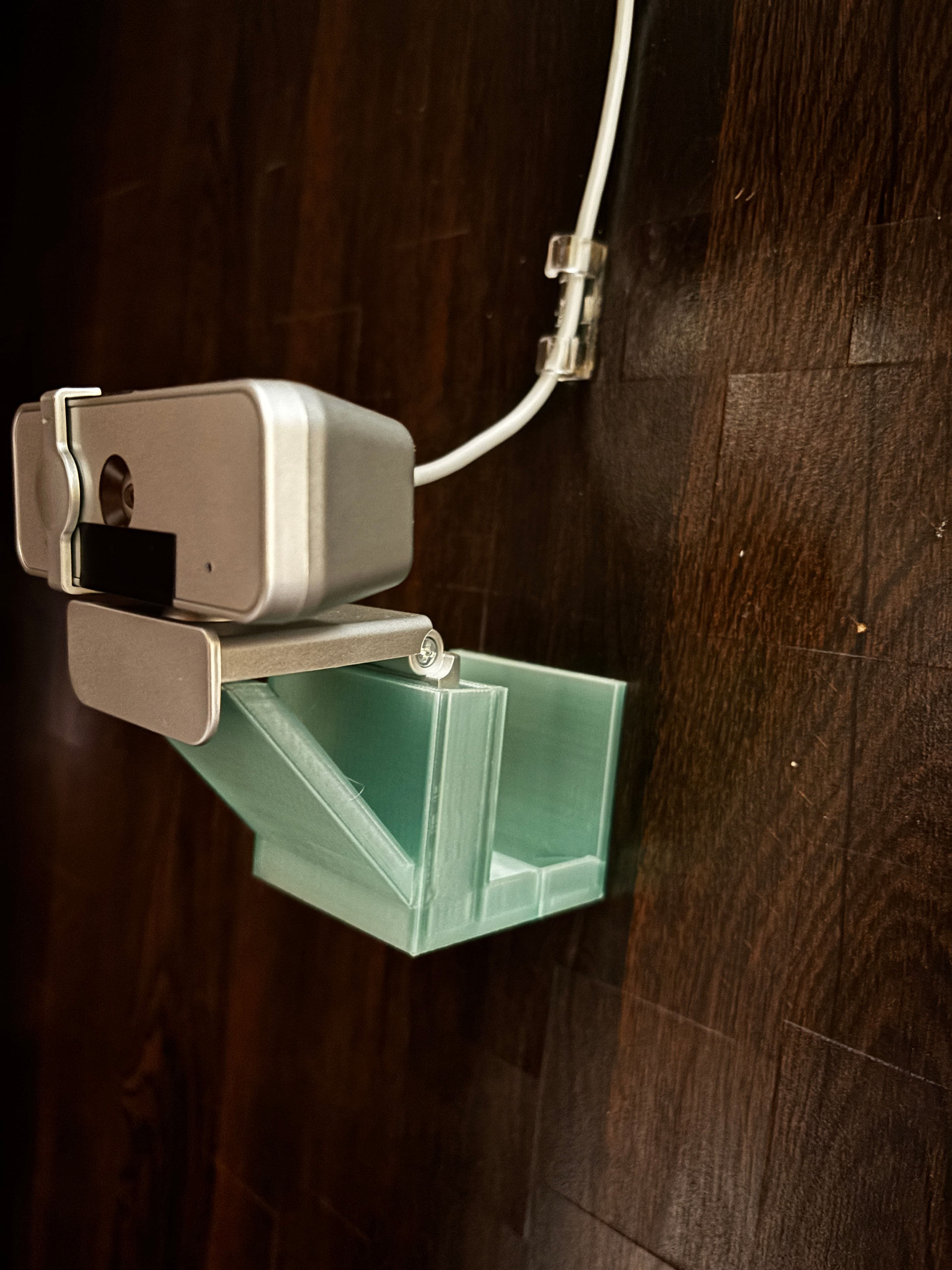
Have to print a 3D case for mounting on the door and set up Agent DVR but seems this setup will work.
To close the chapter, the Linux support is a bit odd. The webcam supports 30 fps at 1080p using MJPEG but reports 5 fps otherwise. When using Agent DVR on Linux, it gets stuck at 5 fps (otherwise camera apps work fine at 30 fps) and I couldn’t make it use MJPEG (maybe there is a way but that would be another hassle).
On the whole though, the tablet I am using with a 5Y10 processor seems to be the primary limiting factor as it seems FFmpeg is a bit too much for it. Decoding 1080p alone pushes the CPU to very high utilisation and enabling recording causes Agent DVR to altogether crash. I have enabled GPU decoding but still not sure if it is being passed to the CPU instead.
After the Linux experience, had switched first to Windows 11 IoT Enterprise LTSC which was plain rubbish and pushing fps to single digits without recording but then switched to Windows 10 IoT which seems to be the most stable. With the processing limitations, I am able to do 1080p24 for live streaming and recording at 50% reduction and 20 fps without stuttering or crashes, which does the job.
Also, regarding the FOV of the camera, it sees about 95% horizontally and 90% vertically of what I would see from the same position and so is much better than the distorted and laggy view from the IP camera. Primary challenge was to mount it in such a way so as to get a clear view from between the rails of the safety door ahead, but managed to nail it after printing 3 prototype mounts.
I tried latest FFmpeg versions and the logs indicate that Agent DVR is unable to initialize any of the hardware encoders. I think this is purely down to drivers as the last one for this device is from 2019.
I think I will try downgrading to an older version of Agent DVR from around that era to see how it works.
Even otherwise, even though the CPU utilization is always 100% it still kind of does the job with the latest version with the quality mentioned above.
I tried using FFMPEG v4 from 2020 with the latest Agent DVR version but it seems that it only supports the latest version. For example, in the release notes for v7 of Agent DVR, they mentioned support for FFMPEG v7, so it seems to go in sync.
Trying an older version of Agent DVR seems to be the only option to check hardware decoding and encoding.