Need some help in decluttering my hardware

I need some help in decluttering the hardware I have hoarded.

I stay in 2 cities for work and hometown, but majorly in my work city.

Work city has a setup with

I9 14900K, RTX 3070, 64GB, but has a monitor with 1440p and 75hz, which I don’t plan to upgrade.

Hometown has a setup with

R7 5700X, RX 6800XT, 32GB, has a 4k 144Hz TV, which I often am not able to use to the fullest, hence play at 1440p 144Hz, even then I get like 70-80 fps max. Always play at ultra settings.

I got a good deal on a laptop with Razer blade 18, 13950Hx, RTX 4080, 32GB, so bought it quickly, without much thought. Work city has power connectivity issues, hence thought of using this laptop once I sell the PC. I have a 600VA UPS, but that doesn’t keep the PC on even for a second and I don’t plan to upgrade it.

None of the games I play have seen 100% usage on any CPU. Though 5700x shows its age with single core usage, but that’s manageable.

I have no usecase other than gaming for all this hardware.

Need your expert inputs on what hardware should I sell and what should I keep.

Note that I travel often (once a month), so carrying laptop is troublesome but not completely out of the picture.

Also, exchanging the work city and hometown PC except for GPU is something I am contemplating about. But will have to bear the shipping risk.

1 Like

let me guess your city :melting_face:

2 Likes

Should be evident from my older sale threads.

No suggestions? :frowning:

You might not like this but if you really want to declutter then sell everything to except the TV.

Move your Tv to wherever to spend the most time (work city) this way you can game on big screen via your laptop. Carry your laptop to hometown whenever you need to move.

RAM will fetch a good price in sale

I am just worried if the laptop dies on me, it will be a big dent on my pocket.

The laptop should ideally perform better than both the PCs though, right?

You can keep the 14900k setup as a backup. There are always if’s and but’s to each suggestion. So do what you feel is okay for your situation..

1 Like

Reminds me of my pandemic times when I had to move too so I had this 10 litre SFF gaming pc - 6 kgs and size of PS5. Used to throw in a back pack and take with me in cabin luggage. Just a monitor in both locations.

If I were you, I would get rid of the Intel 14th gen platform owing to degration issue (sure believe Intel when they its been resolved) and its fellow 8 gb vram gpu and keep 5700X for a possible future upgrade to 5800x3D.

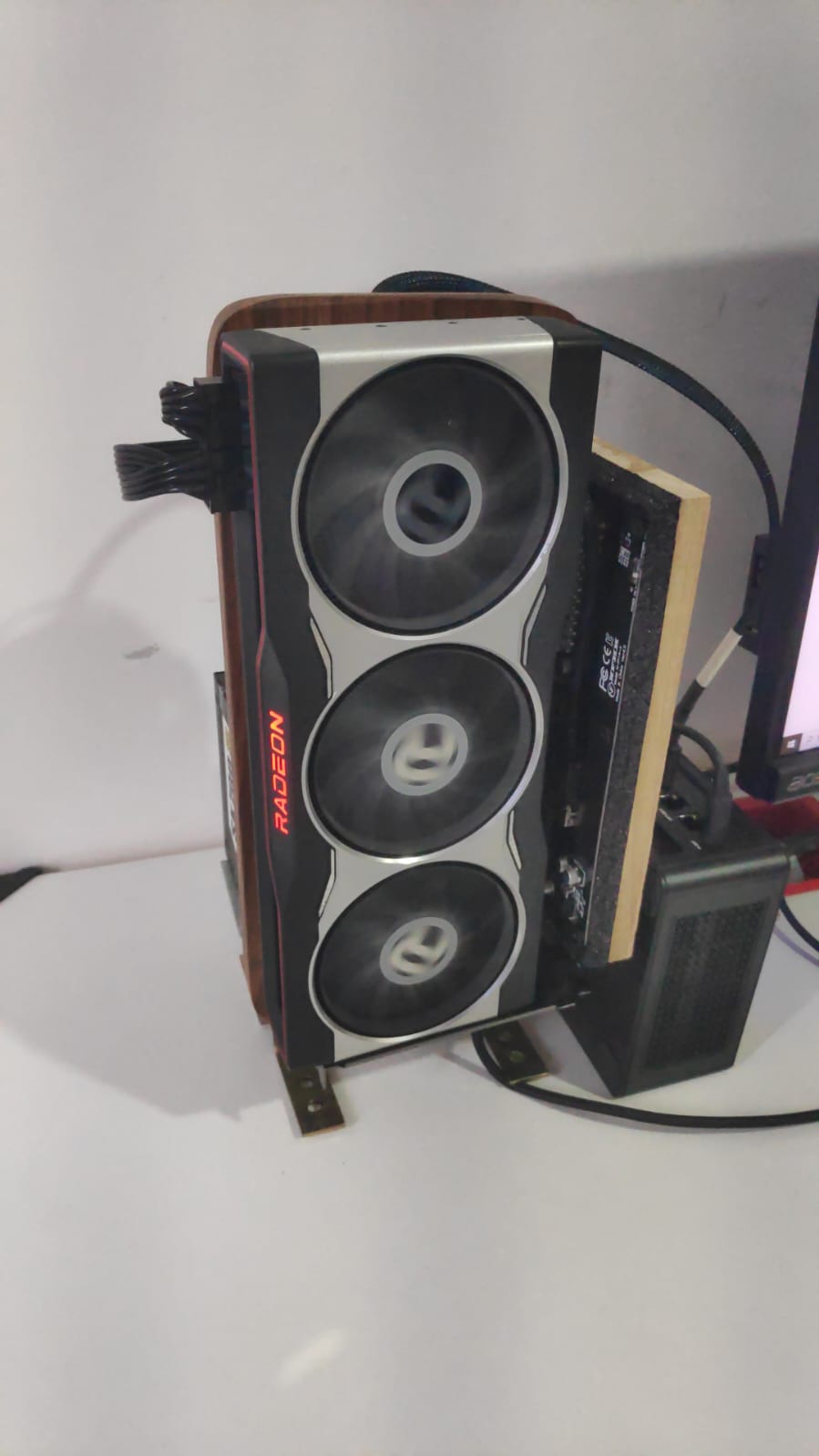
If you want to go really extreme, then I would keep an eGPU - here are a few I own - on each location and only carry the miniPC between travel. I kinda do it from home and office where I carry the Mini PC around as its so tiny (750 grams and 1 litres) and works off of a regular 65W phone charger. Pros of this approach - cheapest and tiniest solution with no compromise on gaming. Cons - High technical expertise and procuring parts.

2 Likes

Ah yes this is the kind of suggestion I was looking for. The mini PC is like mini itx or its a mobile cpu? Also, it would require a thunderbolt port right? Any links you can share for the products I will require?

Also, the 14900k has like 3.5y warranty left and I use it with latest bios and 125W PL1, PL2. So I don’t think there should be a degradation issue. (I know I sound defensive here, but I have seen a lot of reviews and I am a bit confident. Worst case might replace it with 14600k in future?)

1 Like

Maintain status quo and upgrade the UPS :relieved_face:

1 Like

https://imgur.com/a/minipc-egpu-setups-rZ0tbfw

All the links are here. The MiniPC is Minisforum UM780XTX and like most MiniPC it has a mobile CPU but the mobile CPU is Ryzen 7 7840HS and its very capable. Its not like low wattage U-series laptop CPU but a high wattage variant. When paired with my RX 6800, the CPU’s utilization barely crosses 60% in most AAA titles I play in 1440p.

About the interface, Its oculink, (the oculink boards I own have the links in the above album) as I do not have any GPU performance loss over oculink but thunderbolt is also a good approach because you can just use an ultrabook (like a thinkpad) instead of MiniPC but getting agood TB eGPU boardcan be a hassle.

Ah I missed the links, only saw images earlier. Hmm sounds interesting. Yeah mobile cpus are quite capable now for gaming. I got the 13950hx based laptop for that very reason. I saw the PSU hence got confused what I was looking at, but yeah I get it now, that’s to power the GPU.

1 Like

Made a diagram :grinning_face_with_smiling_eyes:

In the most extreme case,

  • you just have a eGPU enclosure + monitor at each location
  • you travel with the GPU
  • you travel with the MiniPC or Laptop (Motobook 60 - oculink can be added with surgery)

This is no gaming compromise + cheapest + least travel volume but unfortunately required quite a bit of technical sophistication and surgery skills (if laptop instead of miniPC)

1 Like

Damn, this is crystal clear, thank you for taking the efforts. And I think this makes absolute sense. I might buy a mini PC with thunderbolt port (hope it exists) to avoid any bandwidth issues and keep my 6800xt. I am sold on this idea but will check additional reviews to see the performance loss. I can live with 5-10% loss but definitely not 30-35%.

It will entail a few months of research unfortunately. Some links from my notes to hopefully shorten yours:

https://www.youtube.com/watch?v=fPOgv63Yvx8
https://www.youtube.com/watch?v=wUCibS6kKnM
https://www.youtube.com/watch?v=TkRXMizMAqE
https://www.youtube.com/watch?v=RSGkExTeryA
https://www.youtube.com/watch?v=wsmFcbWMCDU
https://www.youtube.com/watch?v=AFwp6xI_41o

  • Thunderbolt 3/4 = 32 Gbps => 20-30% GPU perf loss
  • Oculink over PCie 4.0 = 64 Gbps => No perf loss
  • Best device for TB3/4 = any modern laptop, Used thinkpads X1 carbons or T14 are my fav. They have two TB ports!!
  • Best device for Oculink = select MiniPCs by Minisforum or GMktec or Motobook60 laptop if you know surgery.

You can DM me if you choose to enter the rabbithole. ATB

2 Likes

Tb 5 has higher bandwidth right?

Yes TB5 eGPU bandwidth = 64Gbps = Oculink bandwidth

But TB5 devices are very very rare and expensive as of now so thats why I didnt mention.

Ah okay, then yeah oculink makes sense.

How good ?

Damn WTF. HOW

1 Like