My cousin needs a macbook for light video editing and related work. 256gb version is available at 77k with student and card offers while 512gb version is at 95k.
Would it be better to get the 256gb version and a 2tb ssd with nvme enclosure or is that something that doesn’t works perfectly in the longer run?
Also, he is already in apple ecosystem so didn’t try to find any windows equivalent in performance at this price.
18k for 256gb is too much in my opinion.
Specially when options like external SSD is available.
Yes it is going to little cumbersome but lets see even buying 1TB best SSD out there will cost you 10k-11k. You will still be saving Rs 8k plus have 1 TB storage.
And Macbook means he will be carrying around in a laptopbag.
Keeping one small Credit card size ssd will not be a big thing in that bag.
Plus having external storage is added value in long term.
Because reselling value of 512gb in future is not going to be that great compared to reselling value for higher ram ( because many buyers can still deal with 256 Macbooks as long as Ram is beefy)
So you do the maths and see whats best for you but just sharing my thoughts.
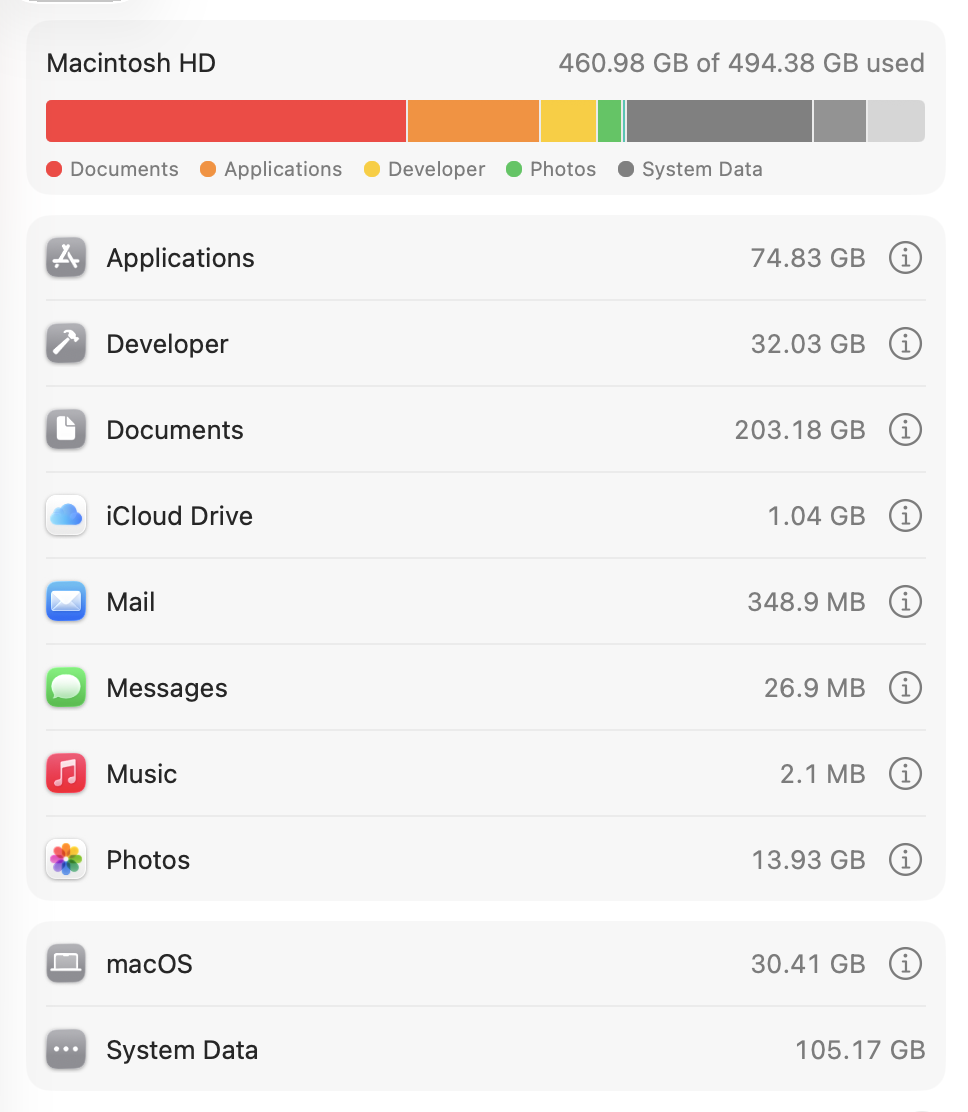
I agree, with 256 managing OS updates itself will become a pain later. 512 with NVME enclosure is a perfect match. I have the 512GB disk and this is how it looks like.
I’m open to both options. For clarity, carrying ssd with him is not an issue he will be always be having a camera bag and with gimbal and stuff too, so having a small ssd too isn’t problematic.
But his files would be huge and I don’t think they can be easily edited when they are on the ssd itself, as mac uses internal storage as swap ram when 12gb ram runs out.
I just checked with him, his current projects are upto 10gb while his future projects might be upto 40-50gb. So I think 512gb version makes more sense for him.
256GB version is not enough at all in today’s day n age.
Reason being Endurance ratings on those (TBW) - 512GB has double the NAND chips. ( This was the case with M1-M2-M3 cannot say for M4 and M5.
Since, you are going for M4 better find deals with M4pro - You would have better screen (Pro-motion display - Mini-LED and better thermals and better SSD Configuration, RAM speeds are tad bit better. )
For an external drives. Either go with an External enclosure+Nvme or Samsung External NVMEs
If the need arises get TB4 enclosure (although they are expensive now - if you can get it imported via someone it is better )
I currently have M1 pro 16inch base model with 2TB Apple cloud and Family Plan of Onedrive (company benefits 5TB) and NAS
What exactly is light video editing and what application will they be using?
Always try and keep your media on an external drive if you can. Also, remeber almost every editing program will create additional files for media databases, etc
You can get USB4/TB4 enclosures for as low as 4K from AliExpress if you have mules.
I don’t know what’s light editing tbh. It’s just what he told me, he is shooting using his iPhone currently for event reels and now he is moving to a Sony dslr I guess to incorporate bigger events and longer videos. He currently edits what he shoots on his phone only afaik.
He may need both storage and Ram in future.
Shooting with Sony DSLR means he will move to serious editing too.
Even though shooting with Iphone is serious.
One of my friend’s girlfriend does Marriage video shooting with iphone and charges hefty Sum for that.
A family member has a 256GB M1 Air + external SSD for graphics editing, and they’re always running out of space on the main disk. Even I couldn’t justify the 512GB upgrade for 20k, but it looks like 512GB is needed.
Secondly, even if you do manage with 256GB, you might be hovering around say ~230GB used with just 20GB free. The storage is not replaceable, plus there were those early concerns about heavy writes. Writes can only be distributed in that 20GB of free space vs much more on 512GB, which will wear the drive down faster.
There are some guides that moves the user’s entire home folder to an external drive, but I’m not sure how feasible that would be for a portable computer.
I am going to go against the grain here and recommend a used pro series m1 max or m2pro if you are splurging on around 96000 on m4 air. Some corporate resellers are selling m1 max macbook pro (32/1tb)with apple care plus till June 2026 for 90000, and it’s a lot of machine for 90000. Never mind the bigger battery, the higher refresh rate display, the higher memory bandwidth, more ram,better ports, more raw performance especially gpu and better’ sustained performance. M4 smashes it in single core, ray tracing and hardware av1 decode support. But it’s not like the m1 max is a slow piece of silicon in cpu performance. And it’s Gpu is more than twice as fast as m4.
If you want to run vm and emulator or play the few games which support ray tracing on mac os, m4 is the only correct answer.
If you want a better overall device which is still good enough to do 4k video editing for upto few years, m1 max would be my recommendation.