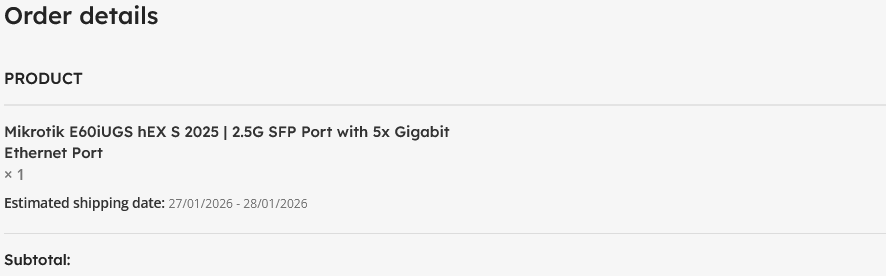
You too can have impressive uptime with Mikrotik hardware!
Mikrotik devices are incredibly robust, stable and advanced users are drawn to them for their command-line configurability but how do you know which model is right for you?
Mikrotik publishes ETHERNET TEST RESULTS for each and every device they sell, these are a set of test results of what the device is capable of before being restricted by CPU. This information is on every product page, at the end of the specifications.
Keep in mind that when a Mikrotik device is pegged at 100% CPU, it still functions (does not lock up) but there will be increased latency and/or packet loss.
I started off my Mikrotik journey with a hAP lite:
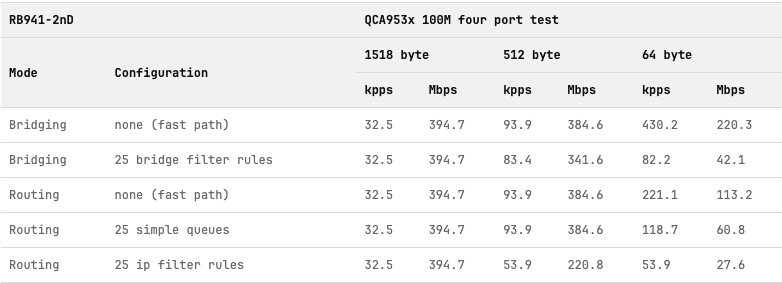
Let’s take a look at the Routing — none (fast path) row, these are the fastest speeds the device is capable of without hardware offloading, CPU only, under ideal conditions.
Generally, you want the value for Routing — 25 ip filter rules at 64 bytes to be around 30% to 50% of your internet speed. The higher it is, the more headroom you have. But 50% at 64 bytes is already crazy high since most traffic these days have packet sizes of either 512 or 1518 bytes (streaming, etc).
This particular model is perfectly fine for 100Mbps networks and is currently the cheapest Mikrotik device you can buy new today — and it runs off usb power!
After a year of using it, and learning everything I can about RouterOS, I upgraded to the original hEX S:
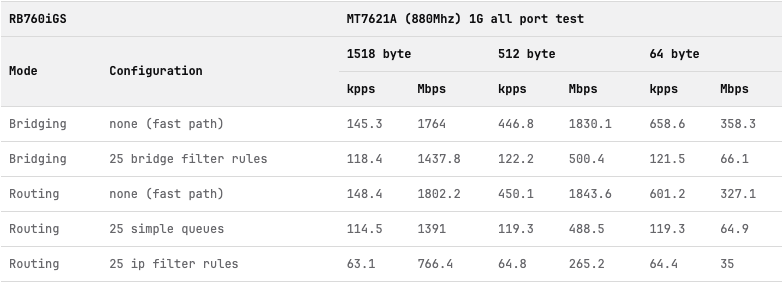
This model has a USB port, which allowed me to connect a Jio hotspot as a backup internet connection. Infact, I could connect a hub and upto six Jio devices. Life was wild during the lockdown.
Anyway, here you’ll see that this fast path test result for 64 byte packets can easily cross 300Mbps, but the 25 ip filter rule test result is only marginally better than the hAP lite.
This model often hit CPU limits with 250 users, that’s when I upgraded to the hAP AC2:
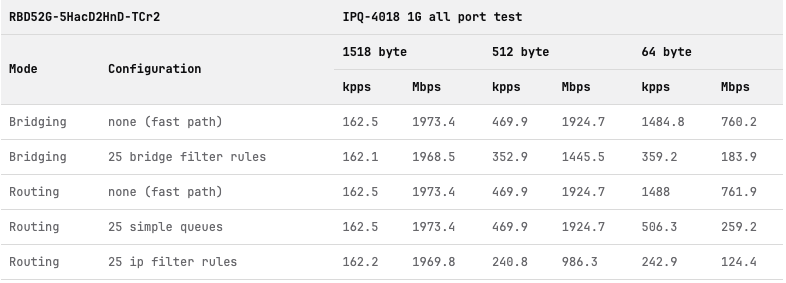
This thing has some serious performance, almost quadrupling the hEX S for 25 ip filter rules at 64 bytes!
It never crossed 30% CPU with 250 users. But then I brought the hammer down with the RB4011:
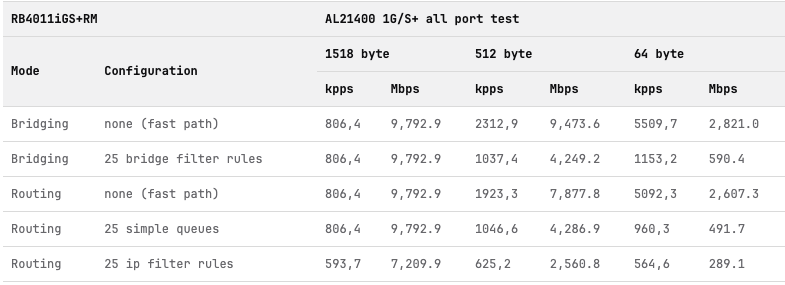
I personally tested this beauty with 9 WAN connections and 2000 users and the CPU stayed under 40%.
Of course there’s a lot more things to consider when selecting a router (ports, storage, power) but here’s a TLDR for the ETHERNET TEST RESULTS table:
Routing - none (fast path) — Best case scenarios, the upper limit of what the device can handle without packet loss.
Routing - 25 ip filter rules — The last value (64 bytes, Mbps) should be around 30% to 50% of your internet speed.