[*]What is your existing hardware configuration (component name - component brand and model)
NA
[*]Which hardware will you be keeping (component name - component brand and model)
Monitor - BenQ 24 inch 1080p
[*]Which hardware component are you looking to buy (component name). If you have already decided on a configuration then please mention the (component brand and model) as well, this will help us in fine tuning your requirement.
[*]Is this going to be your final configuration or you would be adding/upgrading a component in near future. If yes then please mention when and which component
Monitor - probably will switch to a 4K monitor later
[*]Where will you buy this hardware? (Online/City/TE Dealer)
Delhi (Nehru Place)
TE Dealer (for used GPU)
Also Open to online purchase
[*]What is your intended use for this PC/hardware
ML
Dev machine - running multiple containers, multiple browser tabs, Intellij IDE
Would be running under load for long durations.
Won’t be gaming
[*]Do you have any brand preference or dislike? Please name them and the reason for your preference/dislike.
NA
[*]If you will be playing games then which type of games will you be playing?
NA
[*]What is your preferred monitor resolution for gaming and normal usage
4k
[*]Are you looking to overclock?
No
[*]Which operating system do you intend to use with this configuration?
In the same boat.. I am also trying to start with ML. For this I plan to follow cs 50’s AI to cover the fundamentals and then explore in the areas that interest me.
IMO your build looks good. I have the following suggestions:
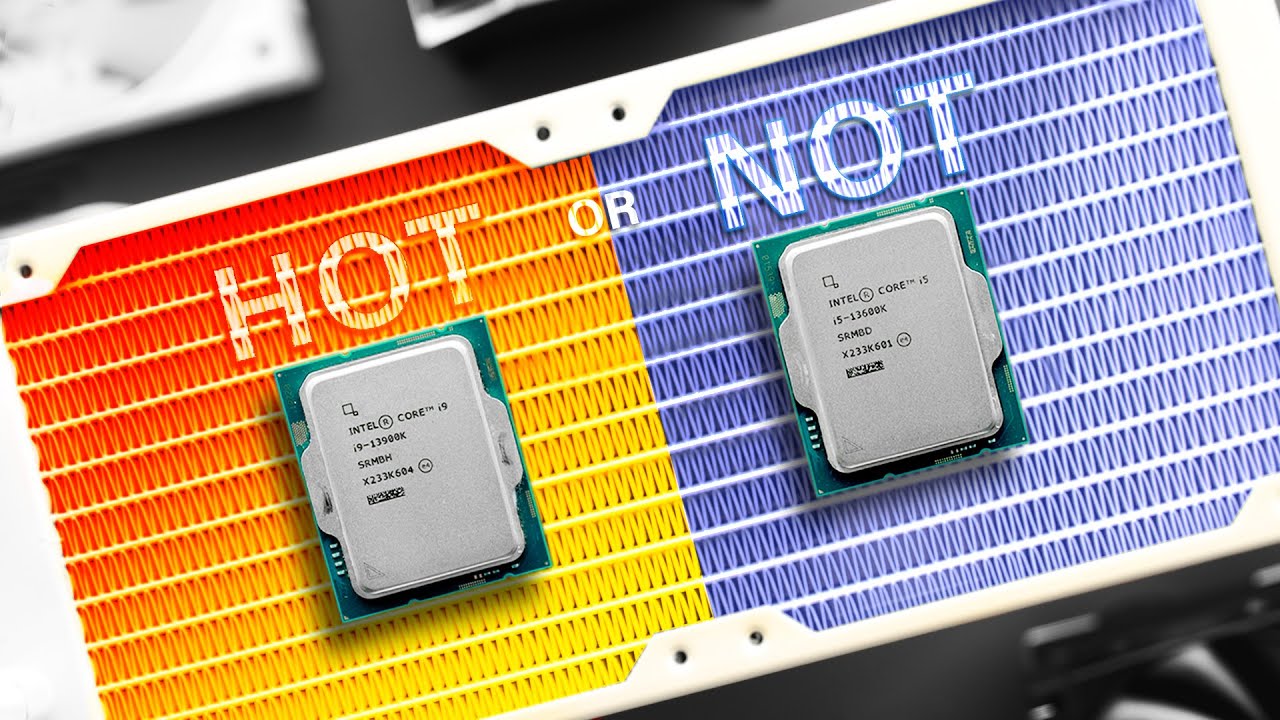
Cooler - Get 360mm AIO. 13700K draws 250W like 12900K. You can get many videos on how hot 12900K gets. 13900K is worse. Check Lian Li Galahad 360mm, check Gamers Nexus reviews of AIOs. MSI M360 is cheaper.
UPS - Get a pure sine wave 2kVA inverter ideally with 200Ah battery, check the power output carefully as 1.5kVA inverters can output 1000W+ but might not be enough if you decide to use other home appliances on it as well. Else, get 1.5kVA UPS, APC is the popular choice.
RAM - Get DDR5 6000MHz CL36 or lower latency, these aren’t very expensive now, unless aesthetics are the priority.
SSD - What capacity? Cost? Avoid 1TB SN850X heatsink because of cost as KC3000 2TB is ~12k now. Also, mobo has heatsink on 3 of its 4 NVMe slots. So heatsink on NVMe is not required. Use the top most NVMe slot first for OS + main usage.
If you get a deal on used 3090 for 60k or so, it will save you a good amount of money. Can consider i9 13900K if you want more cores. Undervolt 13900K or 13700K to reduce power draw, learn it. Not sure how much impact jumping from 3090 to 4090 will make in your usage.
You’ll probably want something more reliable, so I’d suggest steering away from AIOs. Go for a good air cooler like the Deepcool AK620 or Noctua NH D15. It’s mostly your GPU doing the grunt work anyway, so you don’t have to worry about cooling.
Swap out the SSD for something like a Samsung 970 Evo plus or WD SN570.
For the motherboard, any basic Z790 will work. Consider the Gigabyte Z790 UD AC.
Not a geek, but just my 2 cents.
With that budget, i will enquire best hardware providers who deal in premium high-end products for a custom built, asking them about best configuration they can offer.
Now you can post those configurations here seeking suggestions, there are lots of geeks here, who might have practically used/read about those products and give you right suggestions
Don’t rely on shopkeepers hoping that they are the expert. Ideally do your own research. People like me can suggest few stuff, but still do your research. Consider suggestions of people like me as a guiding light, not everyone here knows everything well, some might not be updated with latest stuff as well.
Regarding shopkeepers, 1 seller in Bengaluru told me R5 3600 is better than i5 12400 in gaming because of higher cache. He cleverly told lies with enough technical words to make a normal person fall for it. But in reality, i5 12400 is noticeably better than R5 3600 across the board, be it gaming or productivity. So just an example.
Don’t buy the heatsink variant. Also, if the price is too high, can buy KC3000 instead.
Any 1.5kVA UPS should work, just check their power output rating in W.
IMO avoid air coolers. Just check the difference in temp, performance & freq between good 360mm AIOs & NH D15. You should find the data online. If you are willing to undervolt & maybe limit the performance a bit if temps are still above 90C, then can consider air coolers as they are much more reliable for sure. Do remember that most reviewers keep ambient temp at 21C & India is hotter country. AIOs last 4-5 years, although newer ones have 5 year warranty from some companies.
The 13700 non K doesn’t just have a locked multiplier, but a lower boost clock as well.
Even if you don’t plan on overclocking, you should get the K or KF
One guy over the phone tried to convince me than CL19 RAM is better than CL18 RAM (same MT/s), because it is newer.
Going to a shop and giving them a budget and trusting them to give you the best bang for the buck is not a wise move. Most will try to give you the least capable specs and overcharge you, and make you think that’s the best deal you’re gonna get.
So get a list of parts, ask around for lowest price of each and buy them. You don’t have to buy all the parts at one shop either.
Total = 87k, out of which 46k doesn’t even contribute directly to processing power.
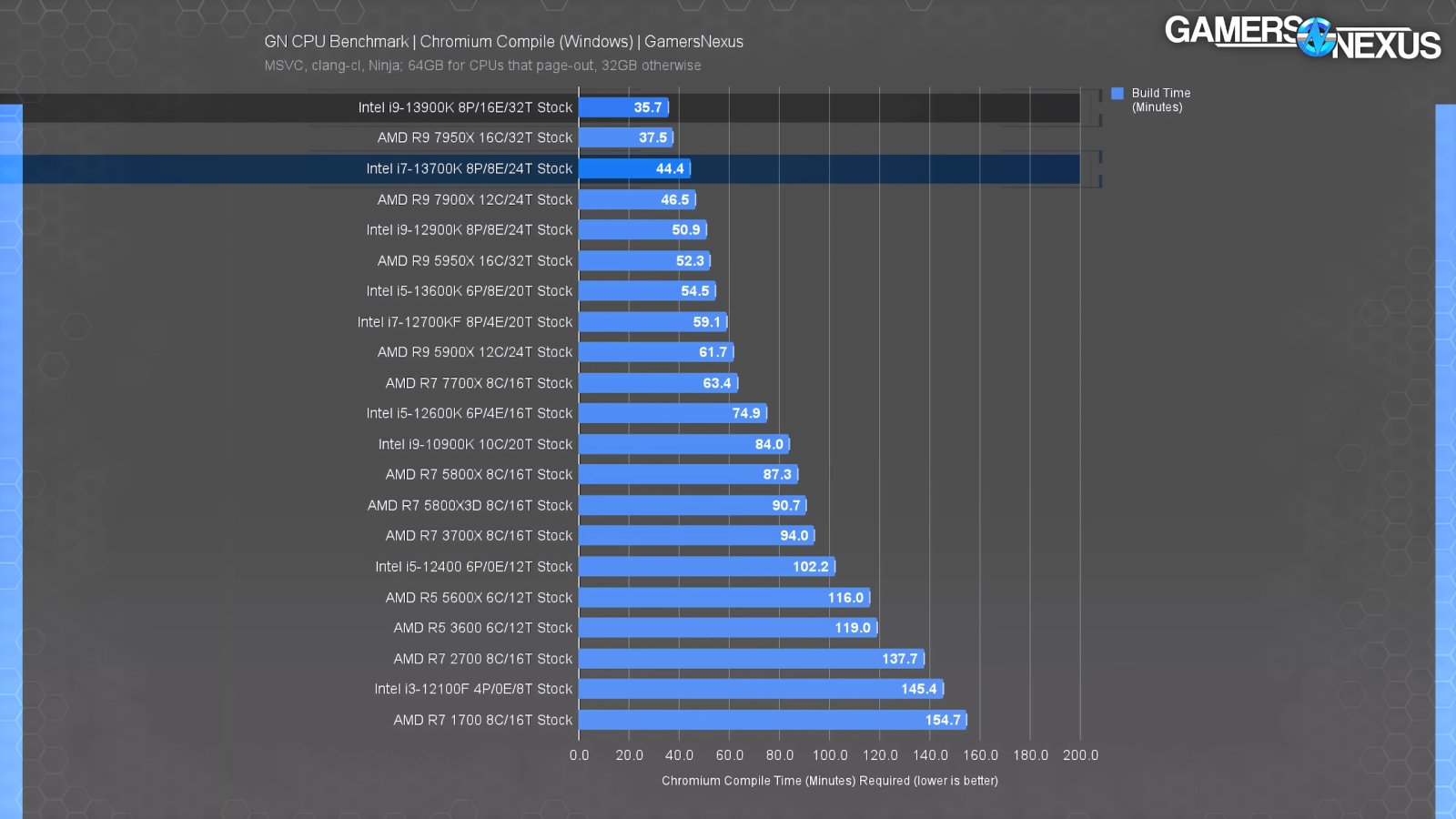
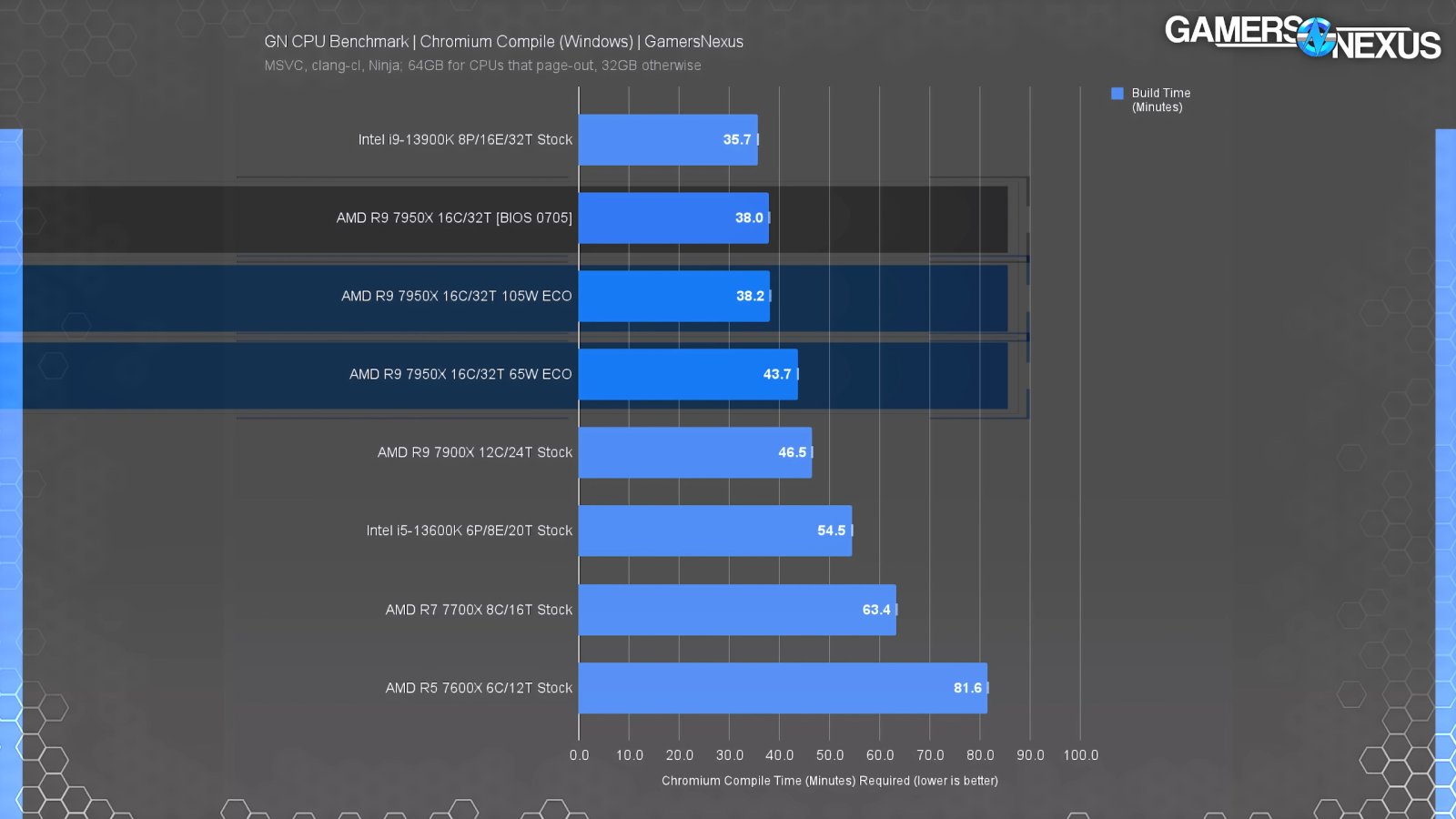
Have you considered 7950X (53k) + X670 (25k) + air cooler (8k)? It will give similar single core performance as 13700k, but way better (actually currently the best) multi core performance, even with a cheaper air cooler.
This is generic advise of course, useless if your program actually needs single core performance, in which case your buy list will certainly let you OC the crap out of it.
Why not go for something simpler as an i5 13600K or Ryzen 9 7900 build? You have seem to have included a lot of stuff that contribute negligibly for reliability and performance.
You could go with any cheap Z790 motherboard, it wouldn’t change a thing from the NZXT one you chose. Look into Gigabyte, Asus or MSI options.
From what I’ve noticed in a few ML labs, ML depends much more on your GPU, and IDEs barely require much of the 13700k, same with containers. Besides, the i5 13600k and Ryzen 9 7900 provide plenty enough horsepower anyway.
An air cooler like the AK 620 is enough as well, you’re not running anything intensive, and even if you were running your CPU on load for longer periods of time (say 20 mins), you wouldn’t notice much of a difference between the air cooler and an AIO in the results.
SN850X is fine but you could get away with a Kingston KC300 or Samsung 970 Evo Plus as well.
These are my opinions, but if you’re willing to spend for the budget you’ve chosen, then your current build is good.
Had gone to purchase Asus Tuf gaming z790, but it was not available at that shop so chose NZXT mobo as
The shop would handle all the replacements/service in case of issues for NZXT, but for others mobo I need to contact their respective service centers.
Had similar specs and price with Tuf.
Its Asrock PCB and bios marketed as NZXT (NZXT/comments/1652xnz/_/jycp57e).
Wasn’t much sure how much periods of intensive load the CPU will run, as I remember compiling firefox source on my current i7 6700HQ and it took more than 40 mins. Just wanted to be on the safer side.
Had to chose AIO due to the above reasons and I wasn’t sure if any more CPU performance would bring noticable quality of life improvement for the increased price.
Talking about thermals, both CPUs try to stay at their thermal limit to give max boost clock speeds. Whether you’re using a 120mm single fan air cooler or a 360mm triple fan custom loop, the [AMD will run at 95°C](’
) under full load. It will hit this temperature in a matter of seconds - they are weird in that they are designed to operate at max temperature no matter how much cooling you have.
TLDR: 7950X outclasses a 13700k, and you will definitely notice the speed difference, even if you’re using an air cooler. Both *will *run hot
(Sorry for the excess KT, I’m considering switching to Team Red and just did all this research weatsmile:)
Considering the cooling requirement of Intel i7 13700K & i9 13900K, surely AMD becomes a better value. Even a power limited + UV R9 7950X on B650 will outperform i7 13700K anyday with ease.
But there are still tasks which run better on Intel vs AMD. Applies for GPU on Nvidia vs AMD as well. OP has to research these sadly.
Well, as mentioned a couple of posts above, both Intel and AMD tend to push for max frequencies even above 90 C. This doesn’t have any impact on its life. While I’m fine with AIOs, I assume that you might also leave your system on over night sometimes. If this were frequent, I’d trust an air cooler more than an AIO.
Check this video for more in depth about Raptor lake cooling -
 weatsmile:)