Nvidia brings driver-level frame generation to RTX 40 GPUs

Nvidia brings driver-level frame generation to RTX 40 GPUs

Nvidia’s Smooth Motion Frames improves gameplay smoothness without requiring development intervention.

Nvidia has released its latest preview driver as part of the new 590 branch, adding Smooth Motion Frames support on last-gen hardware. Though not yet available to the public, this update allows a glimpse at the upcoming features coming for GeForce users.

The GeForce 590.26 driver is targeting developers interested in testing the new Shader Model 6.9, adding Nvidia’s Smooth Motion Frames (SMF) technology to RTX 40 Series GPUs along the way. SMF is the equivalent to AMD’s AFMF (Fluid Motion Frames), which is a driver-level frame-generation solution that works with any game, regardless of developer integration. It uses the driver to inject an additional frame between two traditionally rendered ones, effectively increasing the frame rate in games. In turn, this aids perceived smoothness.

Although SMF doesn’t offer the same image quality as in-game supported frame generation, it has the benefit of being compatible with any game, including those lacking all DLSS features. This makes it a fantastic choice for gamers playing old or unsupported DirectX 11 games, allowing them to boost smoothness with a single click. That said, this is not equivalent to DLSS and FSR upscaling; both of which boost the real frame rate while reducing latency. In fact, all types of frame generation currently available do the opposite, increasing latency due to their need to hold two frames to generate the one in between.

Even so, if upscaling isn’t enough, or simply not available, SMF can be a nice alternative to boost the perceived performance, especially on games that are less sensitive to input latency. I recently used the equivalent on Radeon, i.e. AFMF, and it was surprisingly good for a simple option toggle. Also note that the higher the initial frame rate is, the fewer artefacts you will see, since the higher number of ‘real’ frames will hide any defects in the generated ones. A nice solution to leverage nowadays fast monitors.

A Guru3D forum user tried this preview driver and saw World of Warcraft’s frame rate move from 82fps to 164fps thanks to SMF. Folks at Videocardz did the same with Company of Heroes 3, again doubling the frame rate. In other words, the technology is already in working order, just awaiting general availability, perhaps alongside the next Game Ready driver.

The Nvidia GeForce 590.26 driver is currently available through the developer page. Those owning a developer account can already download and test it. The rest will unfortunately have to wait a little bit longer.

Source: Nvidia brings driver-level frame generation to RTX 40 GPUs | Club386

2 Likes

I had tried AFMF on my Ally and it is plain bad. Have to see if Nvidia has done a better job. Still preferred to use Lossless Scaling due to its tweak ability.

It is also kind of stupid to see declarations on the increase in frame rates without covering latency. Not generally in for laggy smoothness.

My 4090 is aging like a fine wine.
Did nVidia copy Radeon with this? lol.
Arguably the best piece of hardware coming out in the last 5 years. Maybe 7800x3d can rival it.

5800X3D/5700X3D are easily the best piece of hardware in the past 5 years IMO.

Anyways, I plan to use this Nvidia feature with Crew Motorfest (60fps lock), will see how good this is & if artefacts are observed.

1 Like

I was debating the 5800x3d, but between these two, the 7800x3d sold almost double the units if I recall.
Hence, I chose it.

Relying on artificial frames has become necessary, as traditional methods of achieving higher native framerates with minimal latency have reached their limits.

Back in the 8-bit era, it felt like frames were prepared in one cycle and immediately displayed in the next. The response was almost instant.

Over time, this delay has continued to grow. While high refresh rate monitors have helped compensate, the experience still isn’t quite the same.


In AAA games, just moving the mouse reveals that input and response aren’t truly one-to-one. Turning ON Nvidia Reflex or Ultra low latency mode helps, but it still doesn’t feel quite right.

In Counter-Strike, I’ve spent countless hours trying to reduce system latency. Once you start digging into the topic, you’ll uncover a maze of settings that all affect the delay between input and visual response, it’s wild.

And now, the introduction of fake frames is only going to make the experience feel even worse.


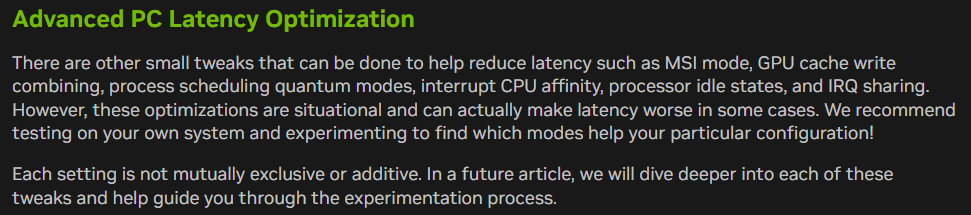
In this article How To Reduce Lag - A Guide To Better System Latency from nvidia.

Look what they are recommending.

image


Newer gamers often aren’t aware of these issues because they never experienced 8-bit or 16-bit era Nintendo games on the original hardware with CRT screen. They’ve never felt what true one-to-one input responsiveness or even something close actually feels like.

Esports titles like Counter-Strike come closer to that ideal compared to most modern games, but even that experience is still a long way off from the real deal.

2 Likes

Im immune to this because i have 30 series card.

1 Like

I have observed artefacts/noise in even DLSS4. I actually played FFXVI at 1440p native TAA than 4K DLSS4 quality mode because of some noise I observed here & there which annoyed me.

I honestly avoid FG, but I can brute force fps because of my 5080. Crew Motorfest will be my first FG experimentation. Anyways, FG will also get better with time. Extrapolating 70fps to 120fps should be good, MFG, not sure if it’s usefulness.

Its just too costly for me as base gpu frame rate drops. Maybe it will work better if it ran on another gpu, and ofc when you are cpu limited or game has fixed framerate.

70 to 120 sounds ok, base frame rate drops to 60 from 70.

Maybe gpu demands are more at higher res / HDR but i have tried it multiple times (FSR framegen on 3080), and only once it was useful.

In cyberpunk for example, from memory, i go from ~85 to 110. That means base frame rate dropped to 55. Just not worth it, did not feel much smoother and latency drop was instantly visible.

But somehow it helped me at 1440p playing witcher3. There it was very smooth, and i did not feel latency hit. Went from 45-50 to 75-80+. Dunno why it worked well.

Witcher 3 is a slower paced game than CP2077.

Anyways the reasons you pointed out are why I have been ignoring FG. If I am able to, I just max out graphics at 4K & play at ~80fps instead.

I am sure they can bring this to 30 series but they won’t

Good thing they brought DLSS4 super to all RTX GPUs (though the new Transformer model has a bigger penalty on RTX 20 series).

Hmm, you don’t say. :grin:

Assuming your display’s refresh rate >= 144 Hz, if you turn VSync off and set a frame rate limit of 160 for the game in the Nvidia Control Panel, it should smooth out from a base rate of 80?

Not 100% sure, but likely yes, need to read about FG.

Right, also, while I mentioned 144 Hz earlier, it might be worth it even at 120 Hz. The wasted extra frames would be a lot more, but if it still feels smoother than 80 fps without any real drawbacks, then why not?

This was meant for FG - ie FSR FG might take relatively more resources for 4k or 4k HDR, enough that base frame rate is severely affected. Don’t have large sample to know for sure, might depend on game too. 85 to 110 or so for example is useless to me and this is what i get with cyberpunk latest version.

It is and i have set a limit in 230s. Which i don’t hit anyway.

FG doesn’t work well for me usually. Base frame hit from 85 to 55 for ex is too high, latency drop is much worse. Anyway, this is on 3080 with FSR FG.

1 Like

Gotcha. An additional resolution/hdr dependent hit is plausible in the absence of hardware acceleration, but I too don’t have data about it.

I’m doing the same. I just cannot get into frame gen.

I also try and brute force where I can with a heavy overclock on my 5070Ti :smiley:

Noooooooooooooooooooooooooo, save your electronics components on the board.

3 Likes

Although I would love to do a 3D Mark (Firestrike, Timespy, and Steel Nomad) run against @OMEGA44-XT’s 5080 stock card, with my 5070Ti overclocked, and see how close the gap is in that scenario and post it here - Post your Game Benchmarks!

What say @OMEGA44-XT ? :poop: