If I’m not wrong, when flashing you get an option to flash both BIOS or to keep backup as-is for a fail-safe.
Oh! I have never flashed dual bios mobos hence the query.
this is for old school boards , but maybe it even works for newer uefi
you should get your main bios chip replaced , go to gigabyte service center and try to convince them to get the board repaired or tell them to replace primary/main bios.
Begin to update backup bios to latest version... rinse & repeat , for people interested in updating their backup bios , i recommend not to keep both the bios versions same
https://www.youtube.com/watch?v=CAozAJa5MYc , for physical short.
those were the days when removal bios chips was a thing , corrupted bios not a problem 
and if getting spare bios chip is difficult than ,ask the repair guy to swap the Backup bios with main bios .board would work fine .Mark your bios chip so that the repair guy doesn’t do some funny business.
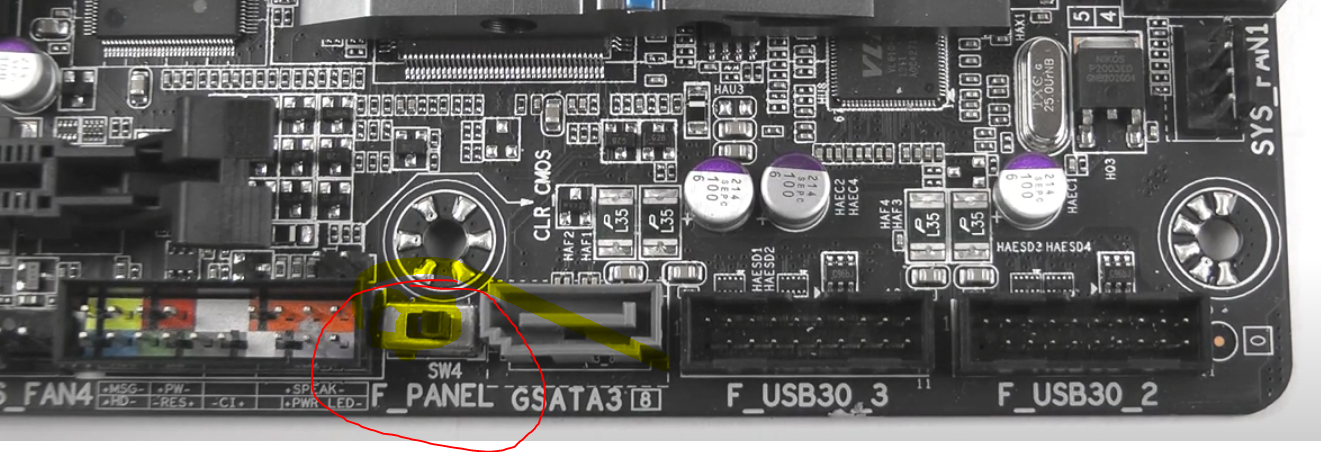
this is physical bios switch which i mentioned you could avoid repairs etc altogether but i do recommend replacing faulty bios chip
Attachments:
2 Likes
While i try to flash the bios I dont get any option, only asks if you want to flash the bios.
Don’t flash bios unnecessarily unless required and mostly MSI Motherboards have very stupid & buggy biose’s. So don’t flash these MSI ones but send them to their service center’s only. I got tired regarding MSI B450 Gaming Pro Carbon AC Mobo issues so sold it off and got myself an Asrock B550 board which too had a default buggy bios but I rectified it by updating to the next stable bios and now the mobo is working beautifully. So I suggest Asrock. But Asus is good then comes Gigabyte and Asrock.
2 Likes
Who handles Asrocks RMA ?
1 Like